
Exploiting Anno 1404
Anno 1404 is a strategy game developed by Related Designs and published by Ubisoft. It is a real-time strategy game that focuses on city management and construction. The Anno 1404: Venice expansion, released in 2010, includes an online and local area network multiplayer mode. During our research, we discovered several vulnerabilities that, when combined, allow for arbitrary code execution from within the multiplayer mode.
Looking to improve your skills? Discover our trainings sessions! Learn more.
Introduction
Anno 1404: Venice is a strategy game available on several platforms, including Steam, Ubisoft Connect, and GOG.com. Our research is based on the DRM-free v2.01.5010 version available on GOG. In this version, only the local area network multiplayer mode is available.
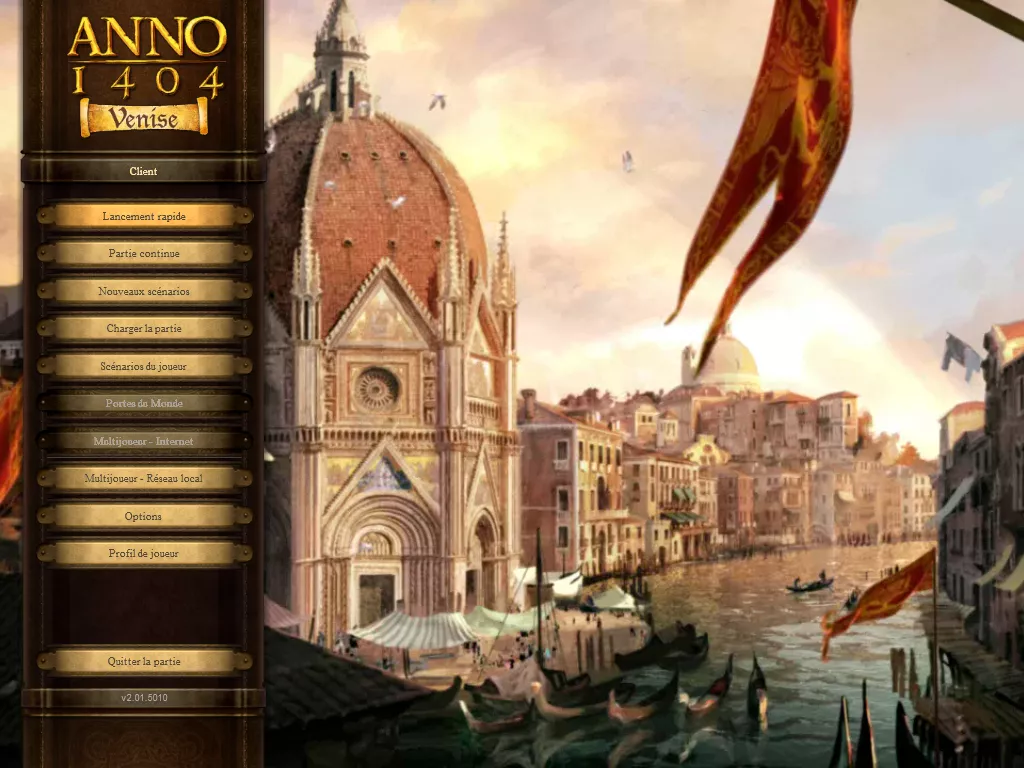
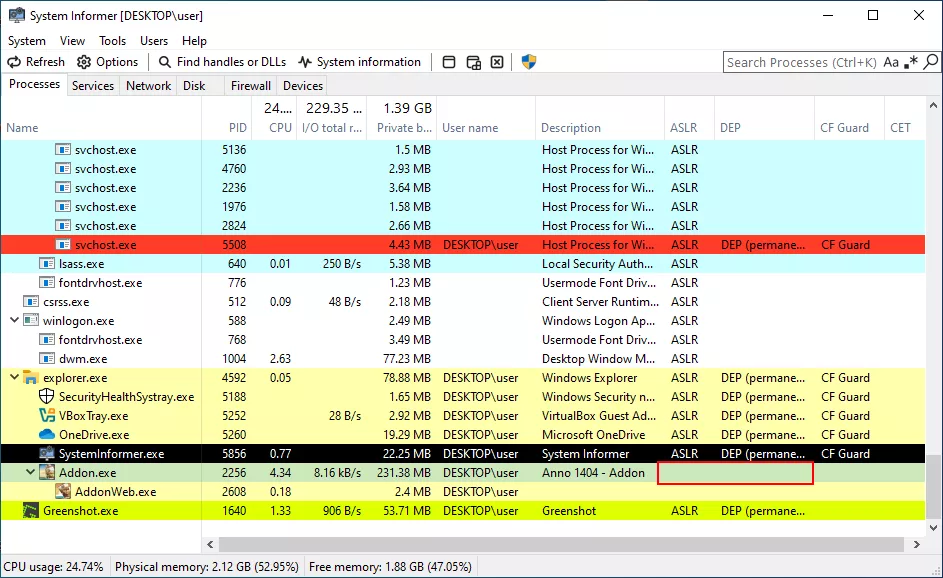
The multiplayer mode allows players to save a game and resume it later. A save file (with the extension .sww) is created by each client and by the host. When a client connects to a host that is running a saved game, the file is automatically transferred from host to clients. This presents interesting opportunities for vulnerability research: how is the file transferred? Are there any restrictions on the allowed files? The proprietary save file format could also be an interesting attack surface. Another interesting point, as you can see below, is that the process is 32-bit and has no mitigations enabled.
There are a few graphics incompatibility issues when starting the game in a VirtualBox VM with 3D acceleration enabled. This can be fixed by forcing the DirectX version via the file %APPDATA%\Ubisoft\Anno1404Addon\Config\Engine.ini
<UseDDSTextures>1</UseDDSTextures>
<DirectXVersion>9</DirectXVersion> <!-- force usage of DirectX 9 -->
<EnableTextureMemoryManagement>0</EnableTextureMemoryManagement>
<EnableModelMemoryManagement>0</EnableModelMemoryManagement>
Network protocol
The game is primarily developed in C++. However, the RTTI and the function names exported by the DLLs make the reverse engineering work easier. On the network side, the game uses its own UDP-based protocol. The protocol is implemented in the NetComEngine3.dll. We first tried to list the different messages exchanged between the server and the client. We have paid particular attention to RMC-type messages, as they provide access to a large attack surface. According to the log string of the method below, the program exposes objects through an RPC (Remote Procedure Call) system.
char __stdcall RMC_CallMessage(ByteStream *input, char a3, ByteStream *source, WString *a5)
{
  ByteStream *v4; // esi
  unsigned int targetObject; // ebp
  const wchar_t *v6; // eax
  const wchar_t *targetName; // [esp-Ch] [ebp-24h]
  const wchar_t *methodName; // [esp-8h] [ebp-20h]
  unsigned int v10; // [esp+8h] [ebp-10h] BYREF
  ByteStream *v11; // [esp+Ch] [ebp-Ch] BYREF
  int Flags; // [esp+10h] [ebp-8h] BYREF
  int methodID; // [esp+14h] [ebp-4h] BYREF

  v4 = input;
  Flags = 0;
  v11 = 0;
  v10 = 0;
  ByteStream::ReadElements(input, &input, 2, 1);
  ByteStream::ReadElements(v4, &Flags, 4, 1);
  ByteStream::ReadInteger(v4, (unsigned int *)&v11);
  ByteStream::ReadInteger(v4, &v10);
  ByteStream::ReadElements(v4, &methodID, 2, 1);
  if ( (_BYTE)source )
  {
    targetObject = v10;
    source = v11;
    methodName = ClassToMethodName(&v10, methodID);
    targetName = TargetName(&v10);
    v6 = TargetName(&v11);
    WString::Format(
      a5,
      (wchar_t *)L"RMC_CALL message RMC_ID: %d, Flags: %d, Source: %x (%s), TargetObject: %x (%s), Method: %s",
      (unsigned __int16)input,
      Flags,
      source,
      v6,
      targetObject,
      targetName,
      methodName);
  }
  if ( a3 )
    return sub_100633D0((int)v4, (unsigned __int16 *)&input, &v11, &Flags, &v10, (__int16 *)&methodID);
  else
    return 1;
}
RMC messages are composed of the following fields: ID, Flags, Source, TargetObject, and Method, according to the log message displayed in the RMC_CallMessage function. Brute-forcing all possible class and method IDs allows for an exhaustive view of the attack surface reachable via this type of message. To achieve this, a Frida script, explore-surface.js, was written, and its output is displayed below this paragraph:
> frida -l explore-surface.js Addon.exe

800000 = RootDO
c00000 = Station
   - 10 = SignalAsFaulty
1000000 = Session
   - 8 = RetrieveURLs
   - 9 = SynchronizeTermination
1400000 = IDGenerator
   - 4 = RequestIDRangeFromMaster
1800000 = PromotionReferee
   - 5 = ConfirmElection
   - 6 = DeclinePromotion
   - 7 = ElectNewMaster
3000000 = DefaultCell
4800000 = SessionClock
   - 11 = AdjustTime
   - 12 = SyncRequest
   - 13 = SyncResponse
7400000 = Player
   - 16 = ForceKickPlayer
   - 17 = Kick
   - 18 = OnCancelSendFile
   - 19 = OnReceivedFileData
   - 20 = OnSendFileData
   - 21 = OnSendFileInit
7800000 = Chat
   - 14 = onNewChatLine
7c00000 = GameSettings
   - 15 = ExecuteOnHost
8000000 = SyncProtocol
   - 22 = ClientToServerPing
   - 23 = ClientToServerSync
   - 24 = ConfirmHost
   - 25 = IdentifyHost
   - 26 = LeftGame
   - 27 = RequestMsgResend
   - 28 = ServerToClientPing
   - 29 = ServerToClientSync
The script displays the valid IDs and names of each object, as well as the IDs and names of each valid method. We've found methods related to file transfers, specifically OnSendFileData, OnSendFileInit, OnReceivedFileData, and OnCancelSendFile.
On the server side, the method rd::netcom3::CNetComEngine3::sendFile is used to send files to the client. An initial "OnSendFileInit" packet is sent to the client, which contains the save game's name (defaulting to Sauvegarde.sww). We can add several ../ to the save file's name using Frida to test the client's behavior. This script is available in the appendix.
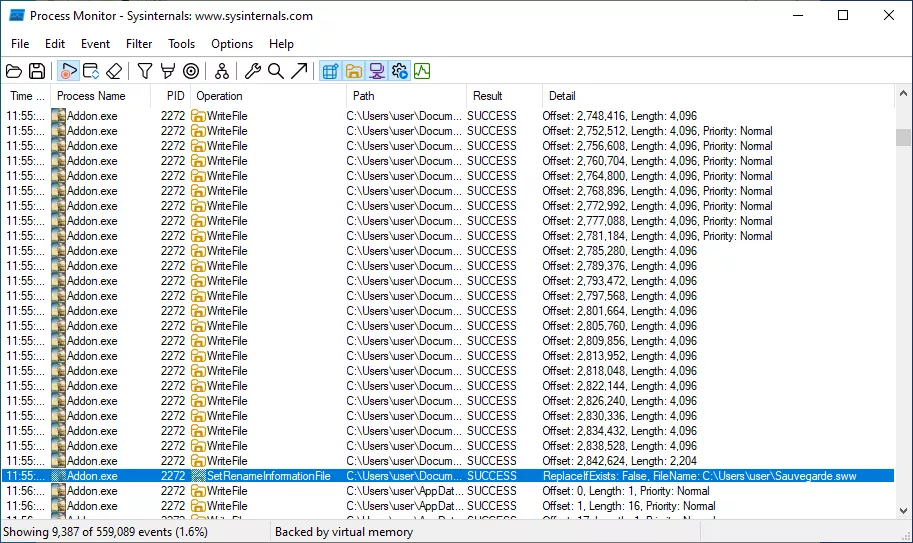
As we can see above, the save file is recorded in C:\User\user instead of C:\Users\user\Documents\ANNO 1404 Venise\Savegames\MPShare. It appears there is no file name verification on the client side. This first vulnerability, a path traversal, allows us to drop a file with the application's permissions almost anywhere on the system with Medium Integrity Level and standard user ACL. The ACLs (Access Control Lists) on the game's installation folder are permissive, which lets a user program deposit any file there.
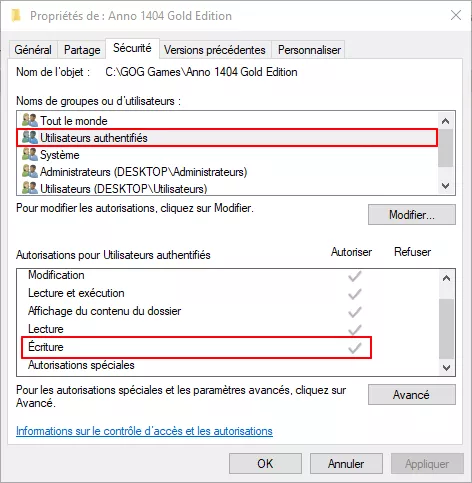
On Windows, dynamic-link libraries are loaded from the application's directory first, then from the system directory. We can drop a DLL that will be loaded the next time the game is launched. This allows for arbitrary code execution, provided the game is restarted. We will now attempt to achieve code execution without having to restart the game. The main idea is to replace an asset with a corrupted one.
RDA Format
The Anno game series uses the RDA format to store various game resources (3D models, sound, textures, maps, etc.). These archives are located in the addon and maindata folders. Tools like RDAExplorer allow you to explore, extract, and modify the content of these archives.
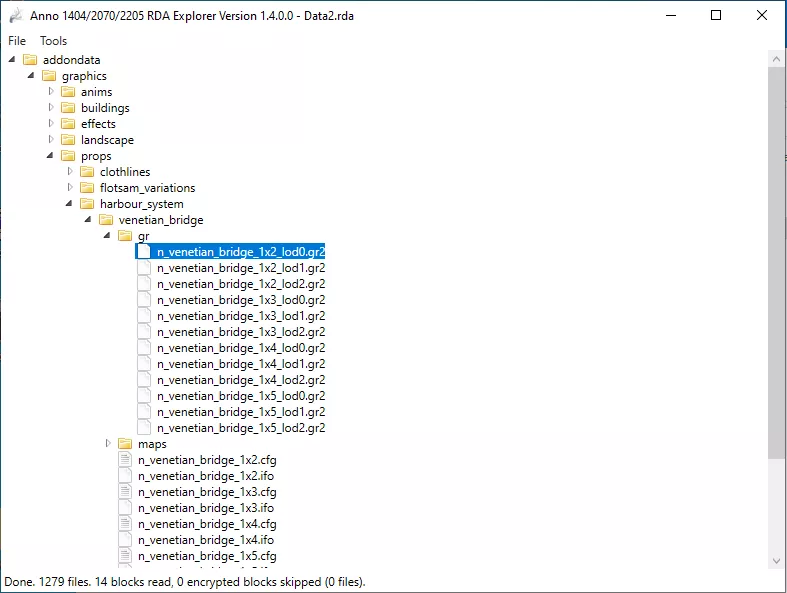
There is no official documentation for the RDA format, but documentation from reverse-engineering efforts is available on GitHub1.
In summary, an RDA file is divided into chained blocks of variable size. Each block contains a certain number of files and their compressed metadata. A file's metadata specifies, among other things, its position and size within the archive. The data is compressed using the DEFLATE algorithm, which is implemented in the zlib library. The diagram below summarizes the structure of an RDA archive.
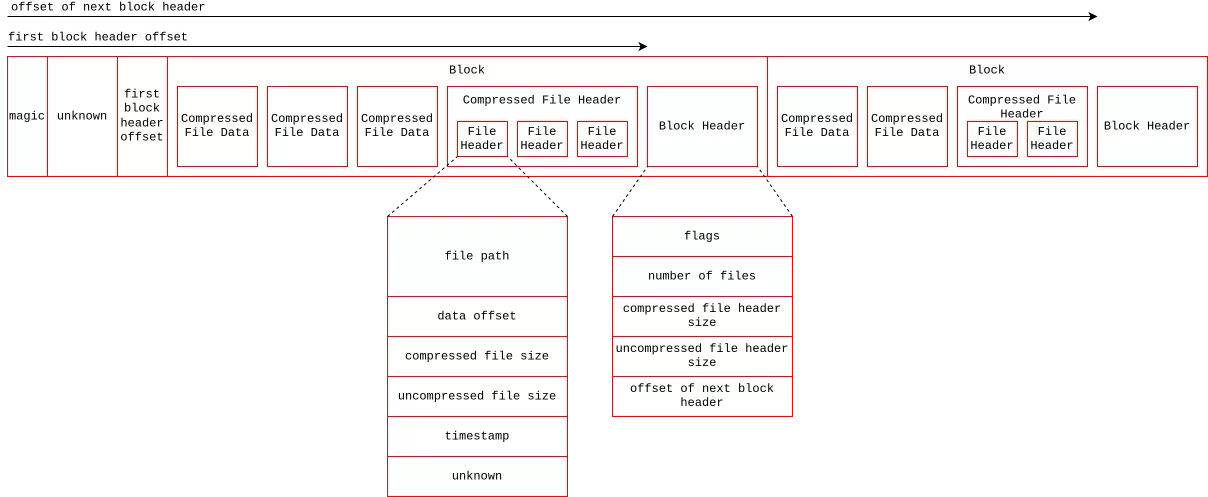
Some blocks can be encrypted, depending on the flag field in the metadata. The encryption used is based on a XOR operation and a pseudo-random number generator initialized with a constant. The pseudocode for the decryption function is shown below.
char __cdecl xor_decrypt(wchar_t *buf, unsigned int size)
{
  signed int index; // esi

  srand(0xA2C2Au);
  index = 0;
  if ( size >> 1 )
  {
    do
      buf[index++] ^= rand();
    while ( index < (int)(size >> 1) );
  }
  return 1;
}
Using Process Monitor, we can observe numerous read accesses to the archives. Therefore, the metadata is likely loaded into memory when the game launches. The file content itself is then only loaded into memory when needed. We've observed that many .gr2 files are loaded during a multiplayer game.
Format GR2
.gr2 files are 3D models saved in a proprietary format developed by Granny Studio. This format was used in many video games of that era, such as the MMORPG Ragnarok Online. The community around that game has partially documented the format on GitHub2. Anno 1404 uses a separate library named granny2.dll to manipulate these files. In short, the format can store information about mesh, skeleton, textures, and materials in different sections. The diagram below shows the structure of a .gr2 file.
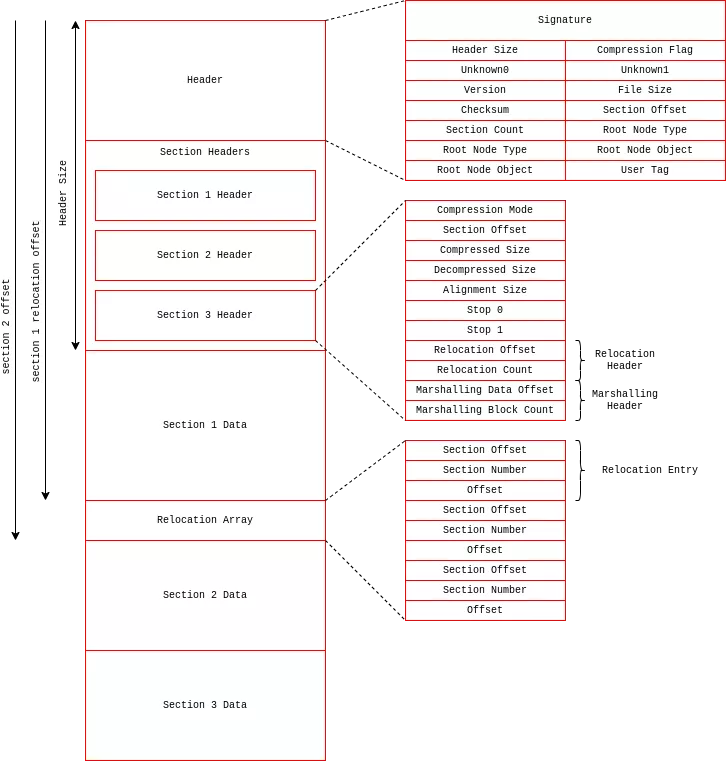
The function GrannyReadEntireFile is used to load a Granny 3D file into memory. The program starts by reading the file header and the section table. Each section is decompressed and then loaded into memory (space is reserved for each section via malloc).
After this, the program applies a relocation table for each section. We believe that sections can contain references to objects within other sections. Since the sections are not mapped to a fixed address, the library updates these references.
An entry in the relocation table is composed of three elements:
- Section Offset : the position of the reference that will be updated (relative to the start of the section associated with the relocation table).
- Section Number : identifies the section that contains the target object.
- Offset : the position of the referenced object relative to the start of the section associated with the object.
Vulnerability
During our study of the relocation application mechanism, we discovered a vulnerability. The entries in the relocation table are not verified, specifically:
- The SectionIndex member is not checked, which can lead to an out-of-bounds read from the array (which contains the base addresses of each section). [1]
- The SectionOffset member is not checked, which can lead to an out-of-bounds write from the destination array. [2]
int *__cdecl GrannyGRNFixUp_0(DWORD RelocationCount, Relocation *PointerFixupArray, int *array, char *destination)
{
  int *result; // eax
  DWORD v6; // ebp
  Relocation *v7; // ecx
  int v8; // edx

  result = (int *)RelocationCount;
  if ( RelocationCount )
  {
    v6 = RelocationCount;
    do
    {
      v7 = PointerFixupArray;
      v8 = array[PointerFixupArray->SectionNumber]; // [1] Out-of-bound read
      result = (int *)&destination[PointerFixupArray->SectionOffset]; // [2] Compute write address
      ++PointerFixupArray;
      *result = v8;  // [2] Out-of-bound write
      if ( v8 )
        *result = v8 + v7->Offset;
      --v6;
    }
    while ( v6 );
  }
  return result;
}
We can imagine building a primitive for arbitrary memory writes if we know the memory address of the section (destination). However, due to ASLR, sections do not always reside at the same address.
Exploitation
It is possible to achieve an interesting memory configuration where the array of section addresses is located before the data of the first memory section. In this scenario, the offset between the section pointer array and the section content is known.
To perform two adjacent allocations, you need to understand a few details about how the Windows 10 heap works. The Windows 10 Segment Heap Internals white paper3 explains the underlying mechanisms very well. There are two types of allocators: the NT Heap (used in our case) and the Segment Heap. The NT Heap is divided into two components:
- LFH (Low Fragmentation Heap): For small-sized allocations.
- Backend: For larger-sized allocations.
The threshold that determines which allocator to use is defined by the constant RtlpLargestLfhBlock within the RtlpAllocateHeapInternal function in ntdll.dll. This value is equal to 0x4000. Since Windows 8, the LFH is subject to allocation randomization, meaning we cannot guarantee that one data block will be allocated next to another, which makes exploitation unreliable. However, the backend allocator has deterministic behavior.
Consequently, we use a file with many sections so that the array of section pointers is allocated in a block size greater than 0x4000 bytes. In order to fill any holes in the heap, several .gr2 files were created. This helps to improve the reliability of the exploit. The diagram below represents the layout of the file in memory once the sections have been loaded. The diagram below shows how the file is arranged in memory once the sections are loaded.
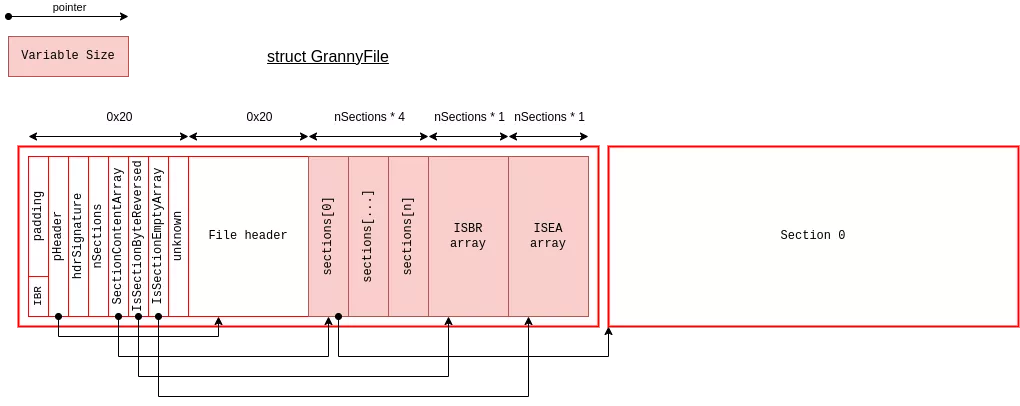
The size of the GrannyFile structure depends on the number of sections. Thus, with a number of sections $n$ = 2720, we obtain the desired size:
\begin{align} 0x20 + 0x20 + n * 1 + n * 1 + n * 4 = 0x4000 \end{align}
The relocation table of the first section is constructed to modify the SectionContentArray[1] pointer. The allocator within the granny.dll library relies on the Windows allocator but adds a 0x1F byte header. The Windows allocator itself adds a 0x10 byte header, and the allocation size is aligned to a multiple of 8 or 16 bytes depending on the system type (32-bit or 64-bit). Consequently, an offset of -0x3FF0 (0x4000 - 0x20 - 0x20 + 0x30) allows for writing into the SectionContentArray.
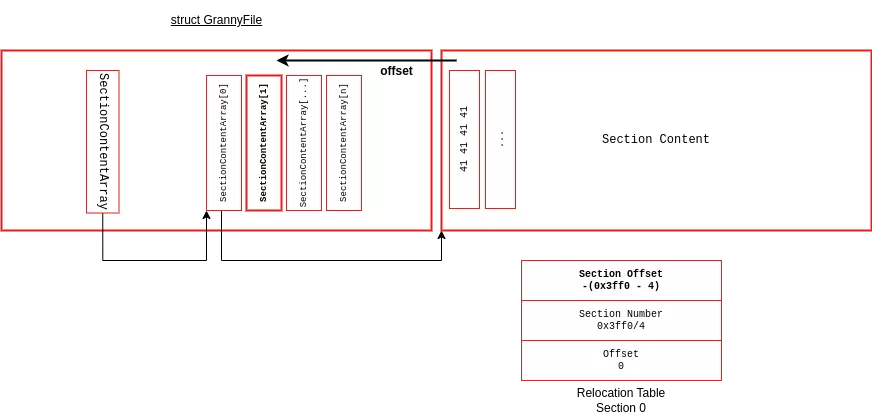
Now that the address of the second section is known, we can write arbitrary values to memory thanks to the relocation table applied to the second section. The granny.dll library is not subject to ASLR (Address Space Layout Randomization), and DEP (Data Execution Prevention) is not enabled. Thus, we can replace the alloc/free callbacks in the library to execute code.
PoC
We successfully exploited these vulnerabilities on Windows 10 (ver 10.0.19045.2965).
Appendix
Script to test path traversal vulnerability :
const ByteStreamWriteStringPtr = ptr('0x1003A250');

const ByteStreamWriteStringFn = new NativeFunction(ByteStreamWriteStringPtr,'pointer',['pointer','pointer'])

const mem = Memory.alloc(1024);
mem.writeUtf16String('..\\..\\..\\..\\Sauvegarde.sww');

Interceptor.attach(ByteStreamWriteStringFn, {
  onEnter(args) {

    if(args[1].readPointer().readUtf16String().includes('Sauvegarde.sww'))
    {
        console.log(hexdump(args[1].readPointer(), {
            offset: 0,
            length: 256,
            header: true,
            ansi: true
        }));

        args[1].writePointer(mem);

        console.log(hexdump(args[1].readPointer(), {
            offset: 0,
            length: 256,
            header: true,
            ansi: true
        }));
    }

  }
});